

An average smartphone user has more than 80 apps installed on their device and the number is ever-expanding, which can keep you drowning in notifications. The more apps we use, the more difficult it becomes to keep track of updates, notifications, and settings. Each app has its way of doing things, and it’s like managing a bunch of different worlds.
Have you ever experienced this frustration? Felt like you’re playing a never-ending game? Don’t worry, you’re not alone. Need someone who centralizes the controls, and frees you from the burden of app management overhead?
The Meta App Manager claims to hold all the answers, Let’s discover how the Meta App Manager can simplify your digital life.
What is Meta App Manager?
A Meta App Manager is a handy tool designed to simplify the management of multiple applications across various platforms. It helps you manage all the operations of the Meta suite of applications such as Facebook, Instagram, Messenger, and WhatsApp, in one convenient location. Meta app manager works as a bridge between your phone and its operating system. It keeps all your apps up-to-date and ensures their smooth running.
Purpose of Meta App Manager
The Meta App Manager’s primary purpose is to simplify and organize your interactions with all things Meta-related, primarily focusing on its family of apps like Facebook, Facebook lite, Instagram, Messenger, and WhatsApp. It handles updates, check user permissions, and ensures interaction between various apps and services.
Features of Meta App Manager
The Meta app manager offers a range of features for meta users on different devices. Here’s a closer look at its key features:
1. App Organization
Tools to organize and categorize apps for easier access and navigation.
2.Monitoring and Analytics
Insights into app usage, including statistics and analytics to track behavior.
3.Personalization
Customization options to enhance the user experience based on preferences.
4.Notifications and Alerts
Alerts for updates, notifications, and relevant information related to apps.
5.App Data Management
View and manage storage usage for each app.
What Permissions does Meta App Manager require?
App Manager, users often wonder about the permissions this application may seek. Here are a few of them mentioned below:
- Device and App Usage Information
- Identity and Account Information
- Location Services
- Camera and Microphone Access
- Contacts and Address Book
- Storage Access
- Notifications
- Network and Internet Access
- In-App Purchases
- Social Media Integration
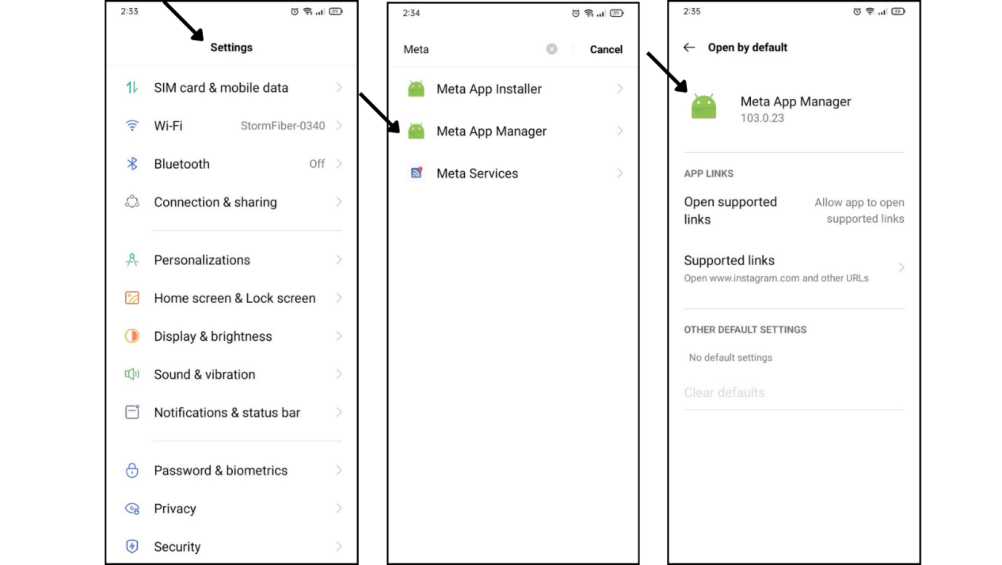
Here are the steps you can use to check and toggle permissions on or off according to your preferences.
Step 1: Open your device settings.
Step 2: Navigate to the “Apps” or “Application Manager” section.
Step 3: Find and select “Meta App Manager” from the list of installed apps.
Step 4: Look for the “Permissions” option within Meta App Manager settings.
Step 5: Review the list of requested permissions.
Is Meta App Manager safe to use?
The safety of the Meta App Manager, like any app manager, depends on your individual risk tolerance and privacy concerns. Usually, it is considered as safe because it’s developed by Samsung Electronics and shouldn’t be considered as a virus, malware, or bloatware.
Potential Risk
- Data Privacy Concerns
- Security Vulnerabilities
- Unauthorized Access
- Data Breaches
- Invasive Permissions
Potential Benefits
- Time Savings
- Optimized App Performance
- Centralized Control
- Improved Productivity
- Customization Options
How to install/Uninstall Meta App Manager?
Currently, many new Android phones come with a pre-installed meta-app manager. This app is in a file format instead of an application format and doesn’t appear on the home screen. Here’s how you can install and uninstall it:
To Install Meta App Manager:
Step 1: Open the app store on your device (Google Play Store for Android)
Step 2: Use the search bar to look for “Meta App Manager”
Step 3: Once you find the app, click on it to access the app’s page.
Step 4: Click the “Install” or “Download” button.
Step 5: Once installed, locate the app drawer and open it.
To Uninstall Meta App Manager:
Before uninstalling the Meta App Manager, ensure you understand how it manages your data and settings across other Meta apps. Consider backing up relevant information or exporting data if necessary.
Step 1: Locate the Meta App Manager icon on your home screen or app drawer.
Step 2: Press and hold the app icon until a menu appears.
Step 3: Look for an option that says “Uninstall,” “Remove,” or a trash bin icon.
Step 4: Click on the uninstall option and confirm the action if prompted.
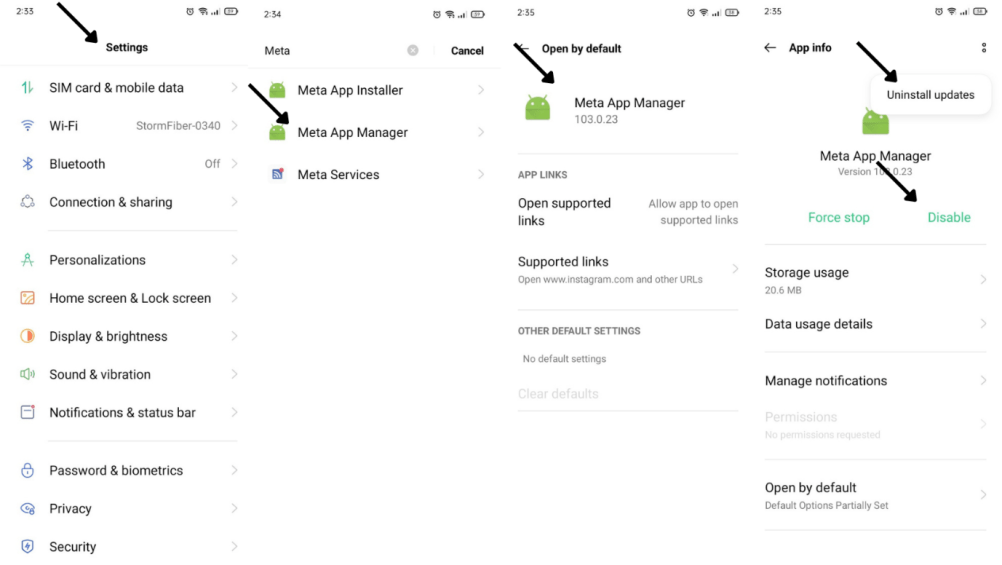
Step 5: Alternatively, you can go to your device settings, navigate to “Apps” or “Application Manager,” find “Meta App Manager,” and select the uninstall option.
Limitations of Meta App Manager
The Meta App Manager offers some helpful features, but it also has certain limitations to consider before deciding whether it’s right for you:
Limited Functionality
While the manager handles basic tasks like updates, notifications, and settings, it doesn’t offer more advanced features. For example, you can’t create or schedule posts across different platforms directly within the app.
Battery and Resource Drain
Some users report the app consuming battery and resources, impacting overall device performance. Consider its impact on your specific device before relying on it heavily.
Incompatibility with Certain Apps
Some apps may not work optimally with the manager.
Security Risks
Security vulnerabilities could pose risks.
Limited Support
The app manager may have limited support or documentation.
Conclusion
In the ever-growing world of Meta apps, the Meta App Manager aims to simplify your experience. While it offers centralized control, convenience, and potential efficiency, users should be mindful of limitations like platform exclusivity, data collection concerns, and evolving functionalities. Weigh the pros and cons based on your needs and privacy comfort level.
Thank you for exploring this topic with me! For further articles on tech and more, visit www.qnnit.com
Frequently Asked Questions FAQs
Q: What benefits could Meta App Manager offer?
A: Potential benefits may include streamlined app management, improved user experience, and optimized performance within Meta’s app ecosystem.
Q: Are there risks associated with Meta App Manager?
A: While specific risks are unknown, general concerns with app managers include privacy issues, security vulnerabilities, and potential data sharing.
Q: Does the Meta App Manager collect my data?
A: Yes, like most apps, it collects data about your app usage, preferences, and potentially device information.
Q: Can I customize Meta App Manager settings?
A: Depending on its design, Meta App Manager may offer customization options. Visit the app settings within the Meta App Manager for any available customization features.
Q: How often should I review Meta App Manager permissions?
A: Regularly review Meta App Manager permissions, especially after updates, to ensure they align with your preferences and understand any new features or changes.


