

Introduction
Have you ever gone through your Instagram DM and found a chatbox with the name ‘Instagram User’ that left you confused about who the person is? You must have quickly opened that chatbox and realized that it was one of your friends. At this, a question must have popped up in your mind, “Why does their profile say ‘Instagram User’, instead of their username?
The first answer you must have given to yourself is that the person has blocked you. But that is not the only case. If you want to know the other possibilities, you are in the right spot. Today, in this blog, we will tell you about What does Instagram User Mean on your DM.
Instagram is one of the most widely used social media apps where you can share pictures and videos and create reels. Another feature of the platform is to chat with one another through DMs. Sometimes, we find an ‘Instagram User’ label in our DMs list. The label either means the person has deleted/deactivated their account, got banned, or has blocked you. Let us explain these possibilities in detail.
What does Instagram User Mean on your DM
Instagram is a social media app where every user has their username. The username is either the real name of that person or a made-up name that becomes your identity through which you are known on Instagram. Sometimes, instead of the username, we see “Instagram User” user-id popping up in our DMs.
In that case, you see a generic “Instagram User” tag instead of the profile username. Moreover, you will realize that the profile picture of that person is missing. You will find the account looking like a dummy or an orphan account that will make you try to figure out who the user is.
Let us tell you the trick to find out who this “Instagram User” actually is. You can open your DMs page right away and read your previous conversation with this “Instagram User” to know who you’d been talking to. But wait, has that person blocked you? Well, don’t be shocked, as that is not the only case.
If you are still able to find a user in your DM list, it indicates that you’re not blocked by that user. However, you can confirm this by texting this Instagram user from another account. If your messages get delivered, it means that you are not blocked. Phew!
Now, let us briefly go through the instances when a username is replaced with “Instagram User” on your DM:
“Instagram User” Tag upon Account Deletion
If someone permanently deletes their IG account, an “Instagram User” tag will appear on their profile. Once someone deletes their account, it will wipe away their profile, including all pictures, reels, and videos. Consequently, they will not be a part of the massive Instagram community anymore.
Account deletion, however, will not delete your previous chats with friends. Your older chats will still be accessible to your friends. However, they won’t be able to find your profile picture or your username which will be vanished after you delete your account. Moreover, your friends can DM you when you delete your account but you of course won’t receive the message.
“Instagram User” Tag when the Account is Deactivated
Sometimes, people deactivate their IG accounts instead of permanently deleting them for some reason. The feature lets you re-activate your account when you want to do so. For instance, someone plans to read a book but can’t seem to quit social media. They don’t want to delete their Instagram account and don’t know what to do.
For such people, IG account deactivation is the best option. The feature temporarily disables your Instagram account. After that, your profile gets deactivated for some time, and the “Instagram User” label shows up instead of your username.
You can keep a distance from the glitz and glamour of the Instagram world for some time by temporarily deactivating your Instagram account. However, the option to reactivate your profile will always be available. Till then, you’ll have the “Instagram User” tag that will be visible to other users.
“Instagram User” Tag when Instagram Bans your Account
Like other media apps, Instagram too has certain rules and regulations that everyone has to follow, no matter who they are and for what reasons they use Instagram. If someone breaks the platform’s rules, Instagram will ban their account.
The terms and conditions are designed for all social media apps that must be taken care of. Otherwise, users have to face the consequences in the form of an account ban. So, if your account gets banned by IG, your username will be changed to the “Instagram User” tag and you will not be able to use your account.
“Instagram User” Tag when Someone Blocks you
Suppose you had a fight with someone on Instagram last night. You want to apologize to the person in the morning, but what you see is an Instagram User tag instead of the username in your DM. if you are certain that the person has not deactivated or deleted their account, or their account has not been banned by Instagram, the only possibility left is that the person has blocked you.
Once the user blocks you on Instagram, an Instagram User label will appear on their profile. Moreover, you won’t be able to see their profile picture. You can still send messages to the person; however, they won’t receive your messages.
What if I Have DMs from “Instagram User”?
If you have Direct Messages (DMs) from an Instagram User, it suggests that someone you had a conversation with has either deleted their account permanently or deactivated it temporarily. Moreover, it can also mean that the person has blocked you on Instagram. It is crucial to mention that sometimes, instead of “Instagram User,” the label “Instagrammer” will appear which means the same thing.
You must be aware that Instagram will automatically delete your DMs with users whose accounts have been deleted. However, they will remain in your inbox for 30 days, after which they will be permanently deleted. In contrast, your DMs with those users will show up even after 30 days whose accounts are not permanently deleted. It suggests that such users have either blocked you or they’ve temporarily disabled/ deactivated their account.
How to Delete or Deactivate my Instagram Account?
One can deactivate their Instagram account from a computer, a mobile browser, or via iPhone. However, it is worth mentioning that you can only deactivate your account once a week. Deactivating your IG account will make all your photos, comments, and likes disappear. However, you’ll be able to see them again once you reactivate your account.
Following are the quick steps to deactivate your Instagram account:
Through a Computer
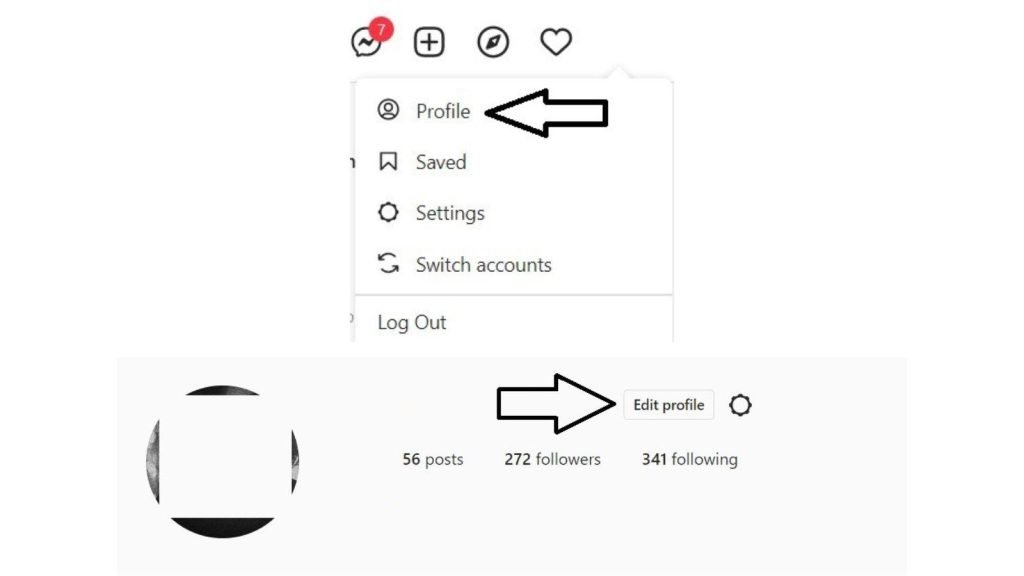
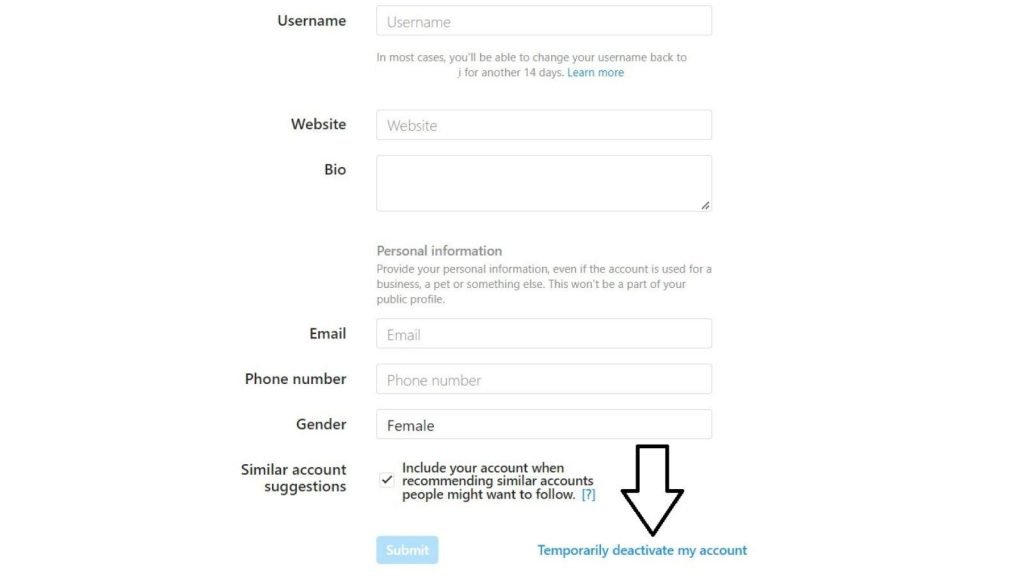
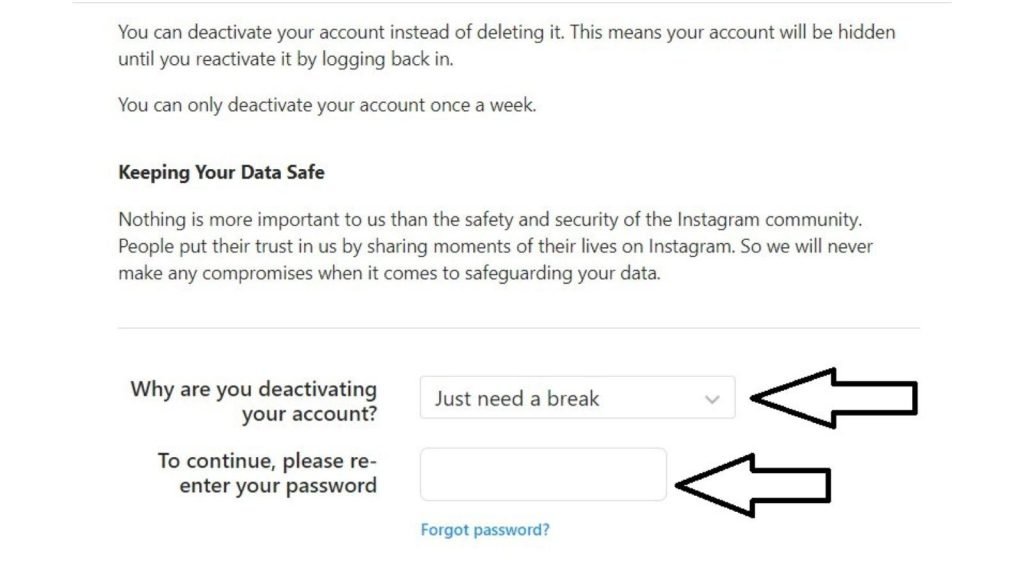
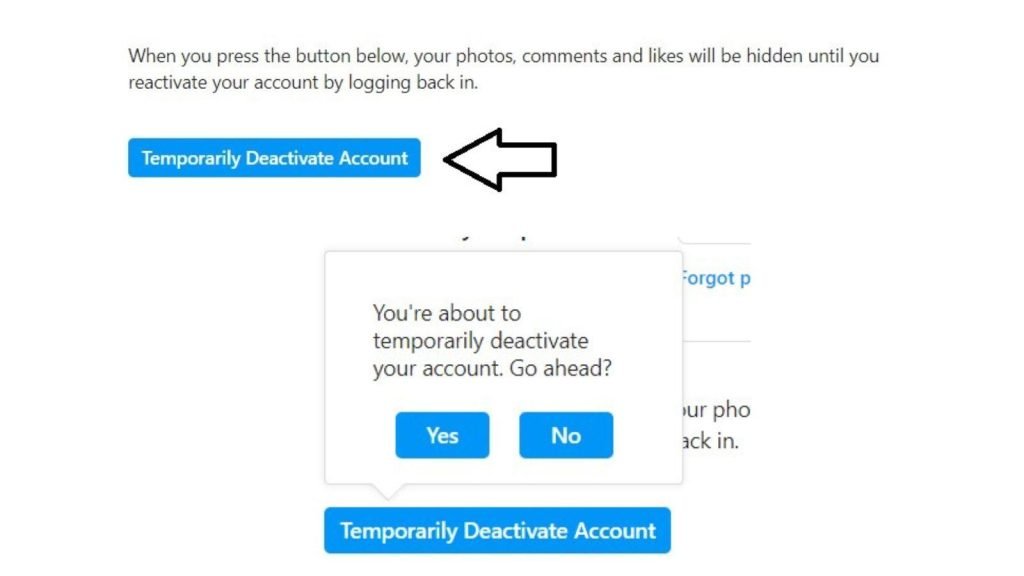
Through a Mobile Phone
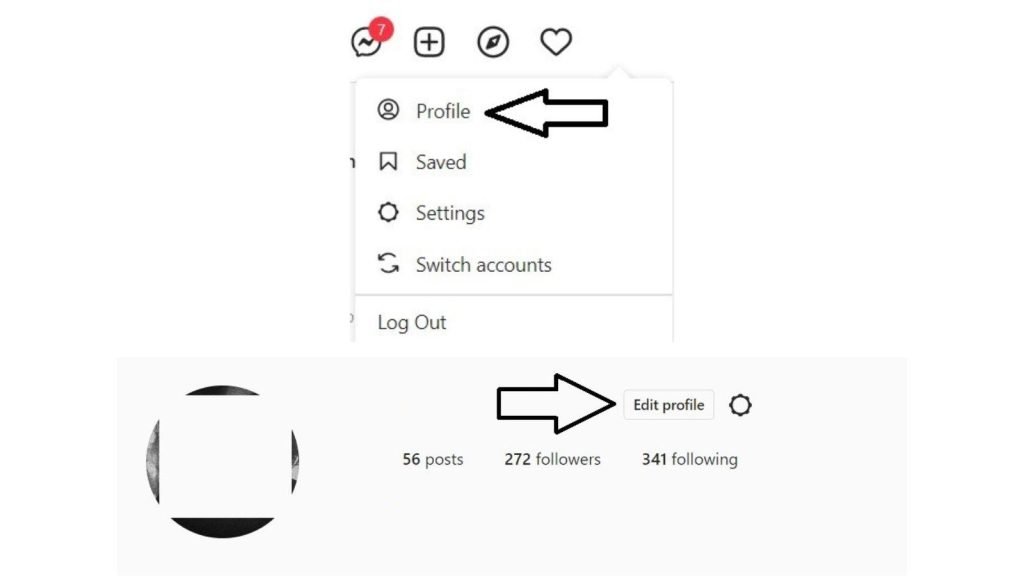
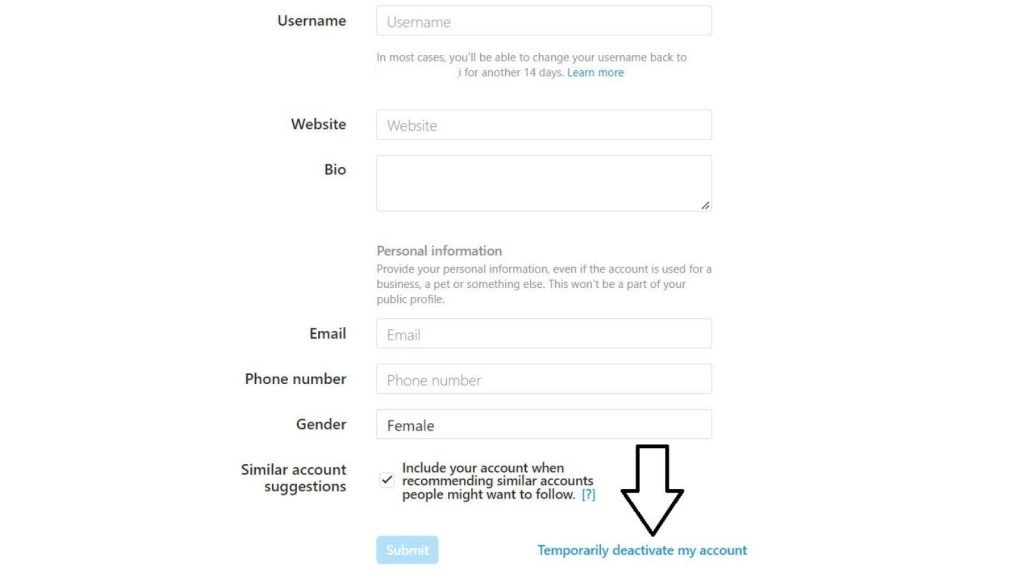
4.Choose the relevant reason from the drop-down menu for deactivating your account. Click “Why are you deactivating your account?” and then re-enter your password 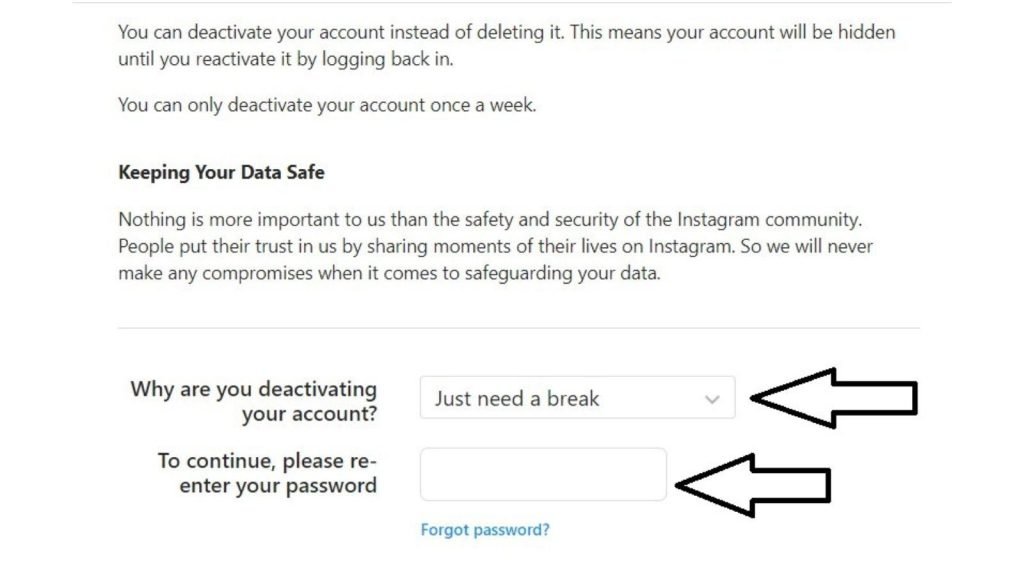
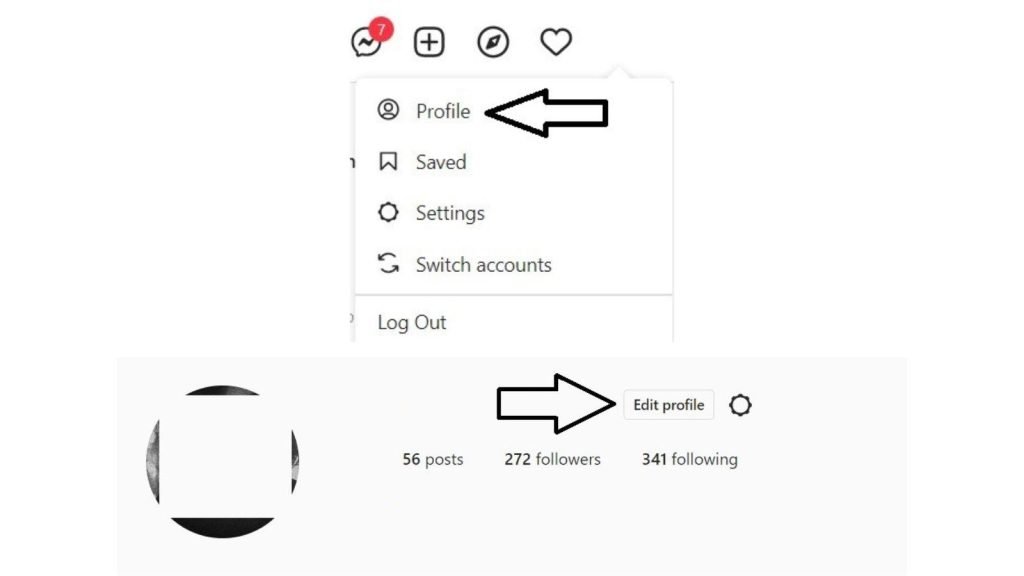
If you want to permanently delete your Instagram account, the following are the steps to do so:
Note: Once you delete your IG account, it will permanently delete your photos, reels, videos, or any other uploads you have done on your profile. If you decide to come back to Instagram later in life, you will have to create a new account. For that, you can sign-up with the old username.
However, if you act against the terms and conditions of Instagram and your account gets banned, it is difficult to get back on the app and create a new account under the old username.
It must be clear that Instagram cannot delete your account for you for security reasons. You’ll have to do it yourself by requesting the deletion. You can save photos and posts before the deletion by logging in to download a copy of them. It is because you cannot access the data download feature after permanently deleting your account.
Deleting through Mobile/ Computer
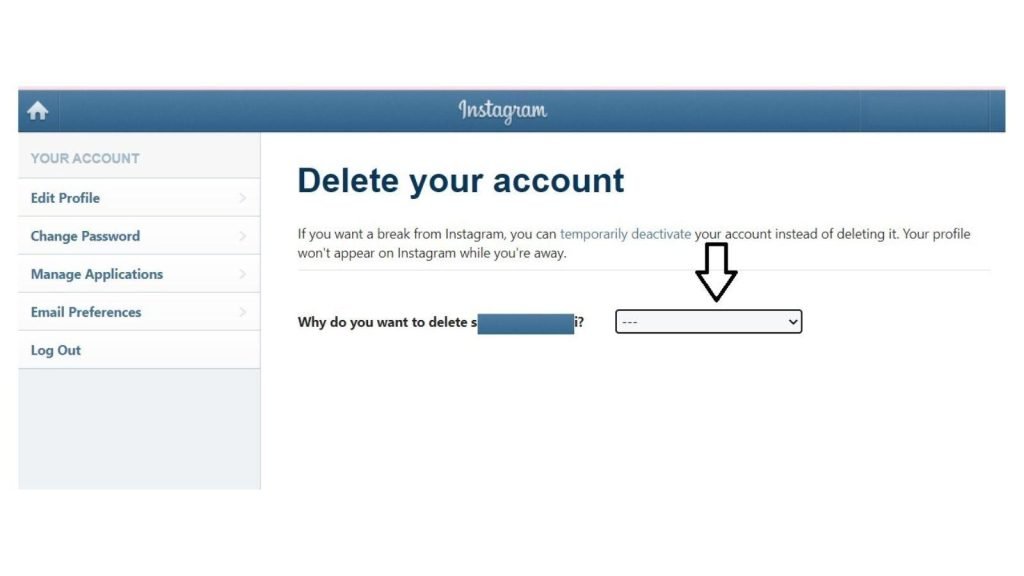
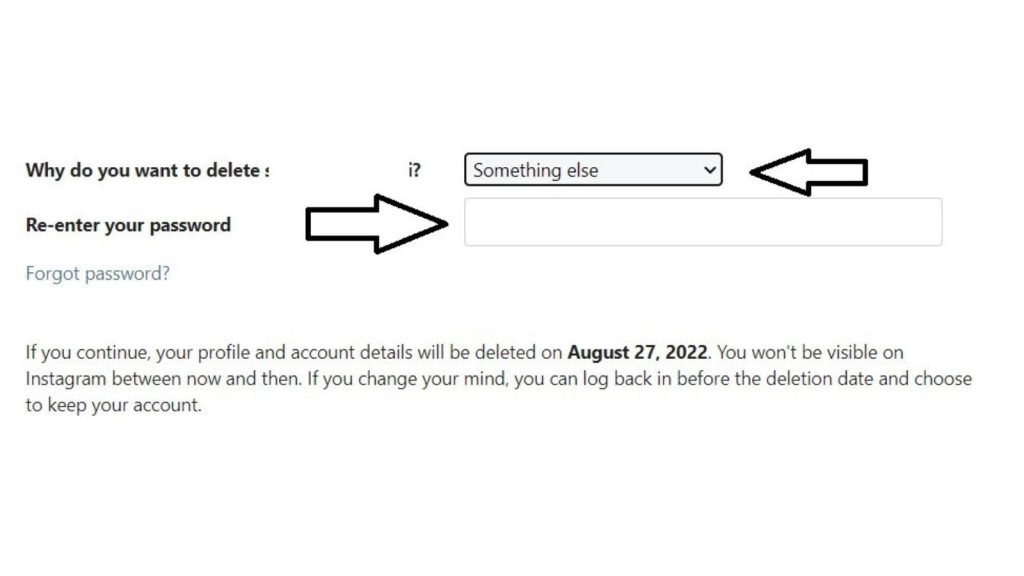
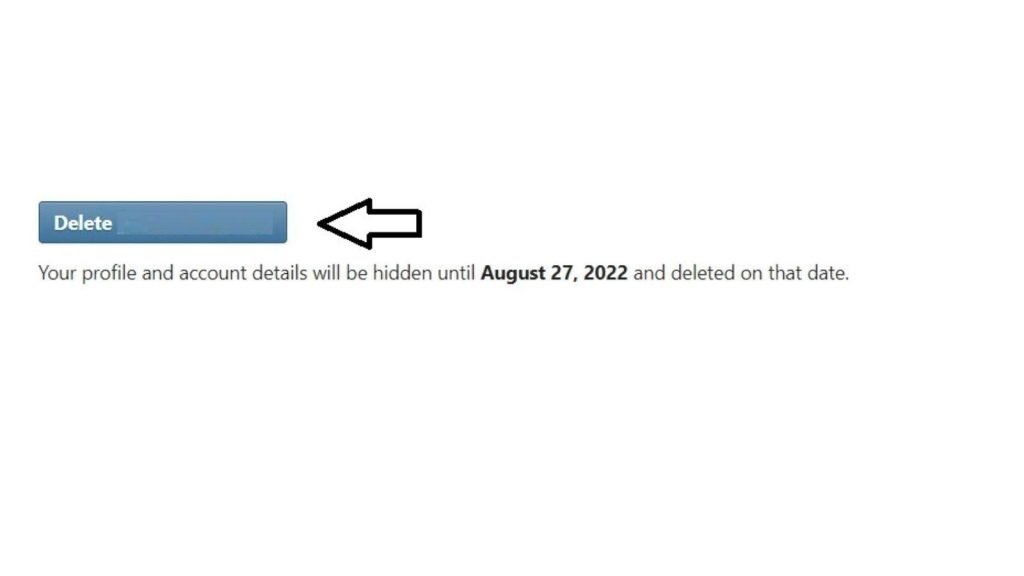
Below are the steps to delete a different IG account:
Conclusion
This blog explored What does Instagram User Mean on your DM. We hope that the next time you see an Instagram User tag in your DMs, you won’t waste your mental capabilities in figuring out what that “Instagram User” tag means. We have explained every possible reason for the appearance of that label. It either means someone has permanently deleted their IG account, deactivated their account, got banned, or has blocked you.
The label is confusing for a lot of people. The first thing a person thinks of after seeing the Instagram User tag is that the user has blocked them. Through this guide, we have explained that this is not the only possibility for the appearance of an Instagram User tag.
You can type the username in the search bar. If the result shows “Sorry, this page isn’t available”, it means that you have not been blocked by this Instagram User.
For more such blogs, stay tuned to Qnnit.


