Introduction
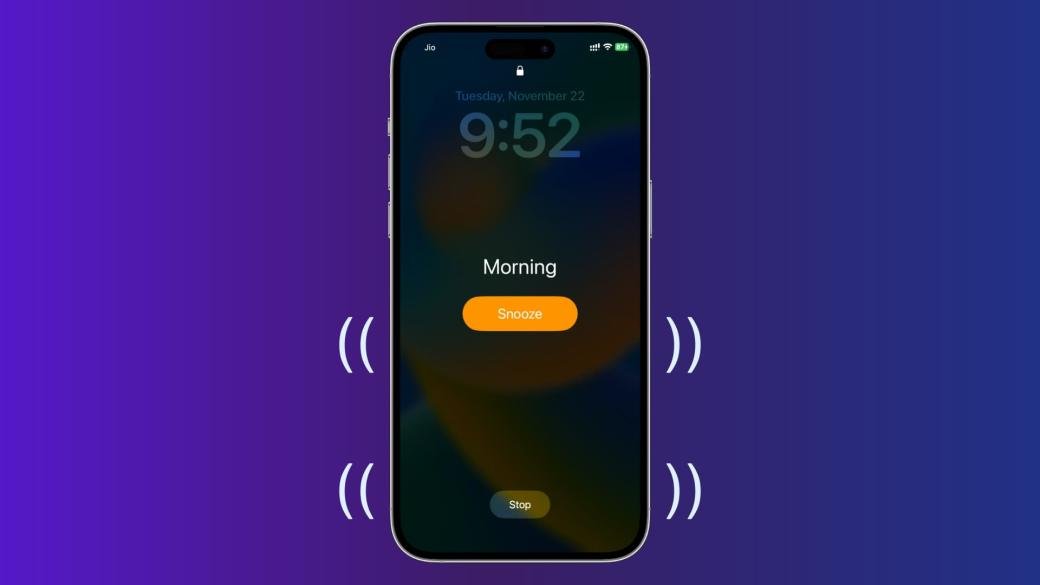
Do not Disturb (DND) feature silences your features such as text messages, sounds, calls, and notifications. This option favours both Android and iPhone users. But, there is a possibility that DND might not silence your alarm. Some iOS users may find out that their DND features do not silence the alarm, which could be frustrating.
The DND settings are accessible and can be controlled to silence the alarm. If you are unaware of the procedure on how to enable do not disturb mode on iPhone and Android, then Qnnit has devised detailed steps for your convenience. You will easily be able to enable or disable the DN function by following the steps in later sections.
All you Need to Know about DND
Following are the important facts to know about the alarm and DND mode:
- Your alarm will go off no matter if your phone is on Do Not Disturb, Silent, or even Airplane mode
- Do Not Disturb, Silent, and Airplane modes will only enable your phone to silence notifications
- If your alarm did not go off, then chances are that you must have made the mistake of choosing PM instead of AM or vice versa
Why did your Alarm Not Go Off in Do Not Disturb Mode?
The blog will focus on the reasons alarms not going off and steps to set your alarm on Android and iOS devices. At the end of this blog, you will be able to troubleshoot and correct the issue with your alarm. Some of the main issues could include alarm time problems, volume issues, and other man-made errors.
Following are some of the main reasons for the alarm not going off:
- The volume was too low to hear
- You must be in a deep sleep and missed it
- You might have turned off the alarm and later forgot about it in your sleep
- The chances are that you must have made the mistake of choosing PM instead of AM or vice versa
Will My Alarm Go Off on Do Not Disturb Mode?
Get one thing straight, and the sooner, the better that your alarm is set to go off by default, no matter the current mode of your phone. But there is an exception only if you use third-party apps to silence the alarm. The type of phone and operating system will also determine whether your alarm goes off or not.
As per some observations, iPhone users will not be disturbed by the alarm in DND mode. Whereas, Android users may be disturbed by the alarm even in DND mode. Android users are offered the choice to select whether their alarm will go off or not in DND mode. You may choose this from the alarm settings.
How to Enable Do Not Disturb Settings?
Android and iOS users can easily enable DnD mode using the swipe function on their devices. Following are the steps to follow:
For iPhone:
- Open control centre
- Hit the focus icon
- Now tap on DND
For Android:
- Open notification panel
- Swipe down
- Now tap on DND
- Or swipe right and tap do not disturb
Now in the following sections, we demonstrate a step-by-step procedure to enable the alarm sound:
For Android
- Launch settings and head to the notification section
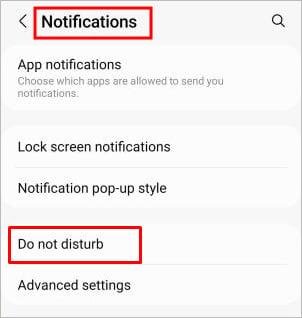
- Now navigate to the “Do Not Disturb” section
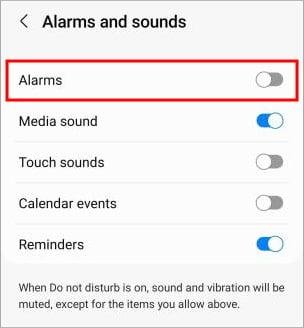
- Tap alarm sound

- To enable the alarm in DND mode, toggle the button to the right or to the left in order to disable the alarm
On iPhone
- Launch settings and head to the notification section
- Now head to the Focus section and then DND
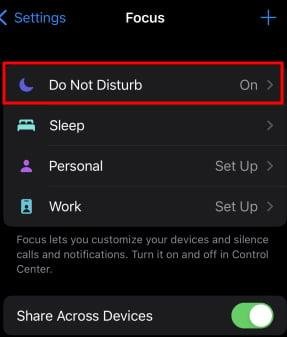
- Hit the apps
- Tap on and select the “Allow Notification From”
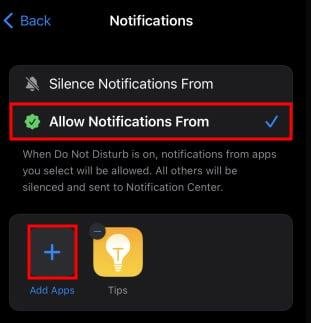
- Tap the “+ icon” to add the third-party app to ring the alarm while in DND mode
- Finally, tap “Done”
Why is my Alarm Not Going Off?
If you are wondering about the non-functioning of the alarm then that could be due to alarm settings. For example, by mistake, you must have changed PM to AM or vice versa. Android users must additionally check in alarm settings if the alarm is enabled in the first place or not.
Follow these steps to set the alarm settings:
- Launch the “Alarm” section and “Add Alarm”
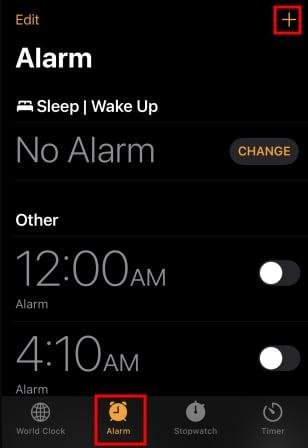
- Now, correctly select date, time, AM or PM
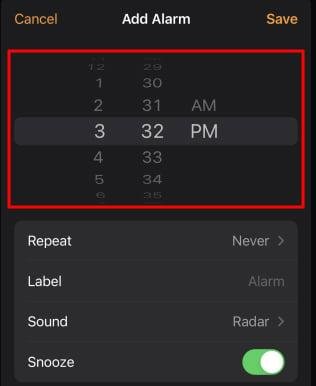
- Select the appropriate “volume” and “ringtone or song”
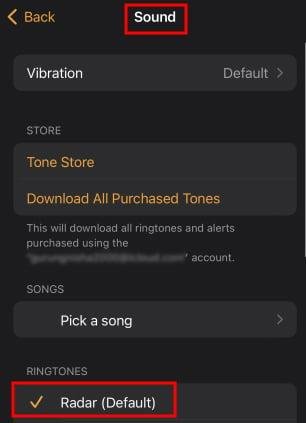
- Finally, save and enable the alarm
Frequently Asked Questions (FAQs)
Following are the FAQs about the DND alarm going off:
Q1: What is Do Not Disturb Mode?
Ans. Do Not Disturb mode is a kind of mobile setting that allows you to silence all notifications. Some may also refer to it as peace mode.
Q2: What is focus mode?
Ans. Focus mode is a kind of feature that improves efficiency and productivity. You can access the focus mode from the app’s sections.
Q3: What is a silent mode on Android?
Ans. The silent mode on Android refers to the silent phase of a smartphone. In this form, all the notifications will pop up without a single sound.
Q4: What is sleep focus?
Ans. Sleep focus is a particular feature that blocks all notifications along with alarms.
Q5: Does alarm still work with Do Not Disturb Android?
Ans. Yes, the alarm still works with DND Mode ON.
Conclusion
Your busy schedule demands no disturbance at all. That is where the Do Not Disturb mode plays an important role in letting you focus on important matters. Android and iPhone users may enable the DND mode on their smartphones. Alarms have their own significance, but sometimes that could be a nuisance. That is why bother android, and iOS users may turn them off from settings.
We are also sharing something more about “9 Best Anonymous Texting Apps in 2023 for Android & iOS”. Additionally, you may also fix “Error Installing iOS 15”. For more such information, please visit our page on a regular basis.