Have you ever had an exciting gaming experience with Xbox that not only amazed you but deepened your understanding of its controller, particularly the LS? Then you have found the right place.
In this article, you will find yourself in the exciting world of Xbox gaming, exploring the location, functionality, and significance of LS on the Xbox controller in shaping your gaming experience.
What is Xbox?
Xbox is a Microsoft-owned brand of video game consoles and gaming services. It was first launched in 2001, with the release of the original Xbox console. Now, Xbox has evolved into a leading player in the gaming business, offering a wide range of gaming devices, software, and other services.
Xbox consoles are specifically designed gaming systems that offer a full-blown gaming experience. The Xbox console family consists of the Xbox, Xbox 360, Xbox One, and the latest ones, the Xbox Series X and Series S. These consoles come with powerful hardware capabilities, high-quality visuals, and access to a broad game library.
 Layout of Xbox Controller
 Layout of Xbox Controller
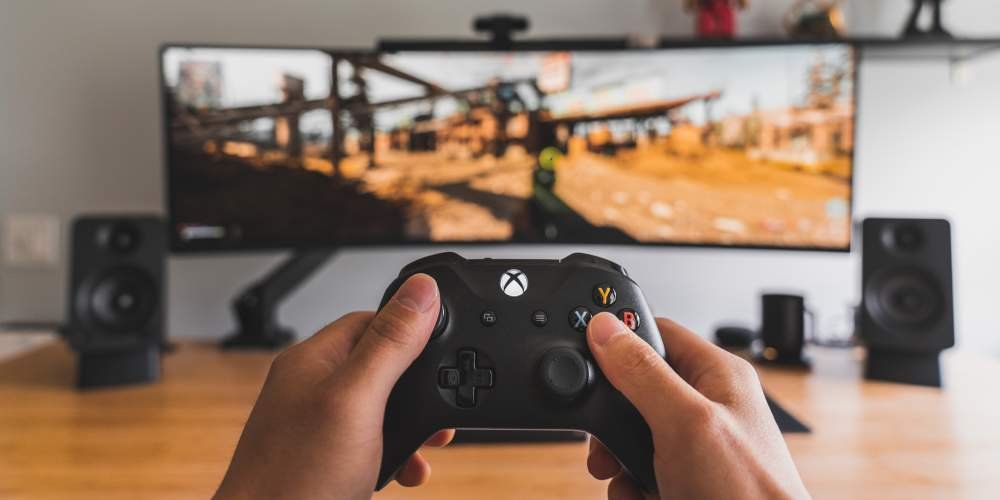
The Xbox controller is a well-crafted gaming controller designed for use with Xbox consoles and compatible devices. It has gone through several modifications over the years and possesses a comfortable design, allowing gamers to enjoy exceptional gaming sessions.
Let’s explore its various components and highlight the role of the LS (Left Stick) in controlling movement and navigation.
Components of Xbox Controller
With its thoughtfully designed contours and grips, the Xbox controller ensures optimal comfort and control, allowing players to fully enjoy gaming adventures. The Xbox controller consists of several essential components. Here few of them are discussed:
Thumbsticks
The Xbox controller features two thumbsticks:
- LS (Left Stick)
- RS (Right Stick)
They play a pivotal role in controlling movement, camera angles, and aiming. With their precise and responsive input, these thumbsticks empower players to navigate virtual environments with ease.

Buttons
Placed for easy access, the Xbox controller’s buttons include the A, B, X, and Y buttons. Each button serves a specific function within games, from jumping and attacking to interacting with objects or selecting options in menus. These buttons provide tactile feedback and intuitive control, ensuring a secure and natural gaming environment.
D-pad
The directional pad (D-pad) on the Xbox controller offers quick and precise directional inputs. It is commonly used for navigating menus, executing special moves in games, or switching between weapons or items. With its distinct cross-shaped design, the D-pad enables players to swiftly and accurately input directional commands, enhancing their control over in-game actions.
Triggers and Bumpers
Placed on the top of the controller, the triggers (LT and RT) and bumpers (LB and RB) offer additional input options.
- The triggers are pressure-sensitive, allowing for variable input depending on how much they are pressed. They often control actions such as acceleration, braking, or aiming in games
- The bumpers, on the other hand, serve as secondary actions or additional inputs, enhancing the overall versatility of the Xbox controller
Understanding the LS
The Left Stick (LS) is a thumbstick located on the left side of the Xbox controller. It is designed to provide analog input, allowing players to control the movement of their in-game characters or adjust camera angles with precision.

Where is LS Located on the Xbox Controller?
The LS is positioned above the D-pad (directional pad) and below the LB (left bumper) and LT (left trigger) buttons on the left side of the Xbox controller. It is conveniently placed for easy access and comfortable thumb control, enabling players to make fluid and responsive movements within the game world.

How does LS Work?
The LS operates through a combination of mechanical and electronic components. It consists of a physical stick mounted on top of sensors that detect its position and movement. The analog nature of the LS means that it can detect and translate varying degrees of movement, allowing for nuanced and responsive control.
When you push or tilt the LS, it registers your input and sends signals to the console or device, which translates those signals into in-game actions. The more you push or tilt the LS, the stronger the input, resulting in corresponding movements or actions in the game.
Functionality and Usage of LS
The functionality of the LS (Left Stick) on the Xbox controller is multi-faceted and plays a crucial role in providing precise movement control and enhancing gameplay experiences. Let’s explore its key functionalities:
Character Movement
The LS allows players to control the movement of their in-game characters with precision. By tilting or pushing the LS in different directions, players can make their characters move forward, backward, left, or right. This functionality is crucial for navigating virtual environments, executing maneuvers, and exploring game worlds.
Camera Control
In addition to character movement, the LS is often used for camera control in games. By manipulating the LS, players can adjust the camera angles, change the viewpoint, or pan the camera to gain a better perspective on the game world. This enables gamers to have better situational responsiveness and enhances their ability to interact with the game environment.
Menu Navigation
The LS serves as a means of navigating menus and selecting options within games. By manipulating the LS, players can scroll through menus, highlight different items, and make selections, providing a seamless and intuitive menu navigation experience.
Versatility and Adaptability
The LS demonstrates its versatility and adaptability across various game genres and mechanics. Whether it’s exploring vast open worlds, engaging in fast-paced action, solving puzzles, or navigating platforming challenges, the LS provides precise control over character movements, allowing players to adapt to different gaming situations.
Enhanced Immersion
The LS’s functionality enhances the overall immersion in gaming experiences. By providing responsive and accurate movement control, it allows players to feel connected to their in-game characters, bringing a sense of realism and agency to their actions within the virtual worlds they explore.
Tips for Using the LS Effectively
To maximize your usage of the LS (Left Stick) on the Xbox controller and enhance your gameplay, consider the following tips:
- Optimize Grip: Maintain a comfortable and secure grip for precise LS control
- Adjust Sensitivity: Experiment with sensitivity settings to find what suits your gaming style
- Fine-Tune Dead Zones: Minimize dead zones for immediate LS responsiveness
- Practice Muscle Memory: Regular practice develops instinctive LS control
- Master Single-Axis Movements: Start with simple movements before advancing to complex combinations
- Utilize Different Speeds: Adjust thumb pressure for variable movement speeds
- Combine with Other Controls: Explore LS combinations with other buttons for advanced actions
- Stay Calm, Avoid Overcompensation: Maintain deliberate LS movements in intense moments for better control
Impact on Gaming Experience
The LS (Left Stick) on the Xbox controller has a profound impact on the gaming experience. It enhances immersion by providing precise control over character movements, allowing players to navigate virtual worlds with fluidity and responsiveness. The LS also contributes to gaming dynamics through its utilization of camera movement, enabling players to adjust viewpoints and explore game environments from different angles. Additionally, the LS facilitates interaction with in-game objects, adding depth and interactivity to the gaming experience. Whether it’s exploring vast landscapes, engaging in intense combat, or solving puzzles, the LS elevates the overall immersion, making gaming more captivating and enjoyable.
LS in Competitive Gaming
- The LS allows for precise movement control, which is crucial in competitive gaming, where split-second decisions and accurate positioning can make a difference between victory and defeat
- The LS’s responsiveness enables competitive gamers to react swiftly to in-game events, improving their ability to navigate complex environments
- The LS’s versatility makes it adaptable to various game genres encountered in competitive gaming. Whether it’s first-person shooters, fighting games, or sports simulations, the LS allows players to fine-tune their movements and execute strategies to respond to the specific demands of each game
Disable or Remapping LS on Xbox Controller
It is not possible to disable the LS (Left Stick) on the Xbox controller. The LS is one of the prime components of the controller’s design and functionality, and it cannot be turned off or disabled. But you can remap the LS (Left Stick) on the Xbox controller. Xbox consoles and compatible devices offer customization options that allow you to remap buttons and sticks according to your preferences. Through the console’s settings or specific game settings, you can remap the LS to different functions or assign it to perform specific actions that suit your gaming style.
Steps for Remapping LS on Xbox Controller
Here are the steps that you can follow to remap the LS and assign different functions to it.
Step 1: Go to the “Xbox Accessories” app from the “Apps” tab in the “My Games & Apps” menu.
Step 2: Connect your controller to the Xbox console or PC either wirelessly or via a USB cable.
Step 3: Select the connected controller within the Xbox Accessories app.
Step 4: Look for the option to remap buttons or sticks.
Step 5: Choose the LS to remap its functionality.
Step 6: Assign a new function or action to the LS.
Step 7: Test the remapped LS to ensure it performs the desired action.
Step 8: Save the remapped settings.
FAQs (Frequently Asked Questions)
Q: How does the LS work on the Xbox controller?
A: The LS works by translating physical movements into in-game actions. By pushing or tilting the LS in different directions, players can control character movement or adjust camera angles within games.
Q: Can I adjust the sensitivity of the LS?
A: Yes, you can adjust the sensitivity of the LS on the Xbox controller. Sensitivity settings allow you to customize the responsiveness of the LS to match your preferences and gaming style.
Q: Can I use the LS for more than just character movement in games?
A: Yes, the LS can be used for more than just character movement. It can also be used for camera control, menu navigation, and interaction with gaming objects, depending on the game’s design and functionality.
Q: Can I use the LS on an Xbox controller with other gaming platforms or devices?
A: The LS on an Xbox controller is designed for use with Xbox consoles. However, with appropriate adapters or compatible software, it may be possible to use the controller and LS with other gaming platforms or devices, though compatibility may vary.
Q: Can I adjust the dead zones for the LS on the Xbox controller?
A: Dead zones are areas where small movements of the LS are not registered. While it depends on the game and controller settings, some games and third-party controller software may offer options to adjust dead zones, allowing you to fine-tune the LS’s responsiveness to your preference.
Conclusion
In conclusion, the LS (Left Stick) on the Xbox controller, located on the left side of the controller, serves as a fundamental control mechanism that enhances the gaming experience. Its versatile functionality and precise movement control make it a vital tool for navigating virtual worlds, controlling characters, adjusting camera angles, and interacting with in-game elements. The LS’s responsiveness and analog nature allow precise movement.
https://www.youtube.com/watch?v=Ahp43A-yr1E&pp=ygUfV2hlcmUgaXMgTFMgb24gWGJveCBDb250cm9sbGVyPw%3D%3D