Why is ErP Ready essential, and what does it mean? Technology makers have been including energy-saving features in their devices to promote sustainable practices and environmental preservation.
ErP Ready in the BIOS is a functionality often appearing in modern computer systems. A European Union rule, ErP, or Energy-related Products, aims to lower energy use and greenhouse gas emissions.
In this article, we’ll examine the idea of ErP Ready in BIOS and consider how it helps to improve computers’ energy efficiency.
What is ErP Ready in Bios?
ErP, which stands for “energy-related products,” is a term given to refer to environmental rules established by the EU for various devices, including PCs.
Your computer’s ErP Ready setting prevents power flow to all components when turned down, bringing the overall power consumption down to 1 watts or less.
Why Should you Enable ErP Mode?
When your PC isn’t in use, you should enable ErP Mode mainly to increase your power savings. It’s a simple, cheap approach to lessen the environmental impact of your PC.
Enabling ERP mode can help you save money on electricity over time, especially if your computer system is regularly unused. Allowing ErP reduces power usage during the shutdown.
Why Should you Disable ErP Mode?
It wouldn’t influence your user experience because it only takes effect after your PC is turned off. Be advised that ERP mode can be disabled your ability to start your PC using Wake-on-LAN remotely.
You should turn off ErP Mode if these are essential aspects of your workload. If the PC isn’t being used, there’s no need not to have it enabled.
How to Enable or Disable ErP Mode?
Simple instructions for enabling or disabling ErP Ready can be found in the computer’s BIOS settings. Specific instructions may change depending on the motherboard’s producer, BIOS version, and computer model. A general description of the procedure is provided below:
Step 1: To access the BIOS at startup, restart your computer and click the proper key. Del, F2, F10, or Esc is the often-used keys.
Step 2: Use the arrow keys on your keyboard to navigate the options once you’re in the BIOS.
Step 3: The “Advanced” or “Power Management” section must be found. Depending on the BIOS version, this section may be located in a different place.
Step 4: In the “Advanced” or “Power Management” section, look for the option labeled “ErP Ready,” “ErP Support,” or “EuP,” depending on the BIOS version.
Step 5: Using the + and – keys, the Enter key, or by selecting the option and pressing the key displayed on the screen, change the setting to “Enabled” or “Disabled.”
Step 6: Exit the BIOS after saving the modifications. Depending on your choice, the computer’s ErP Ready feature will now be enabled or disabled.
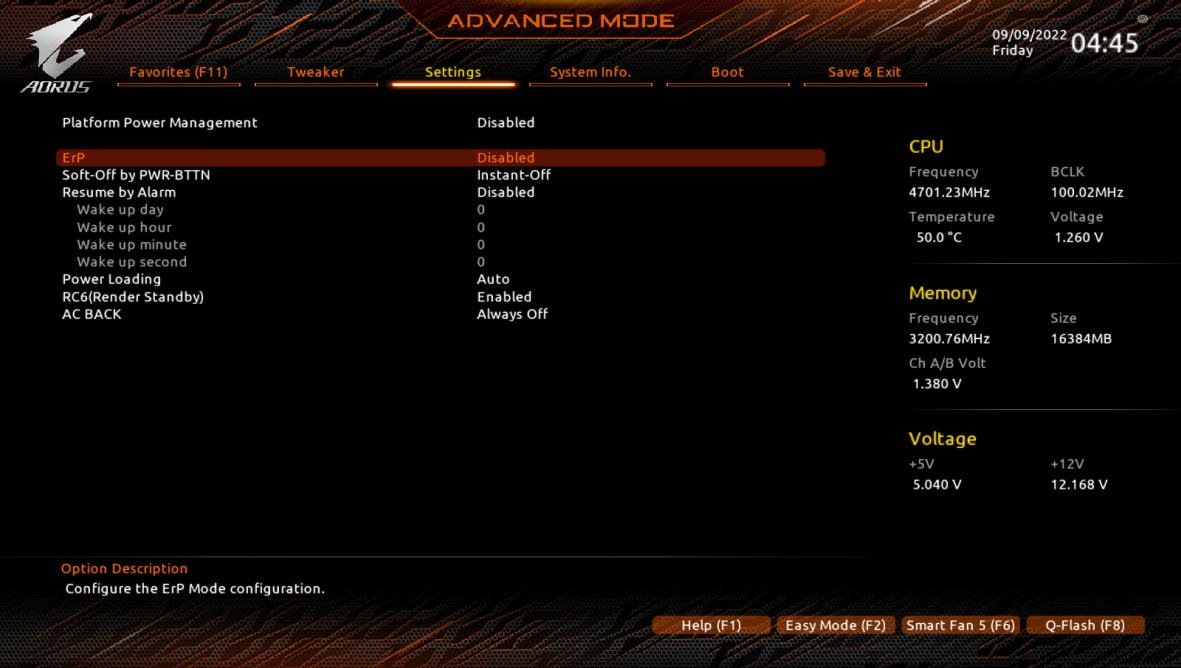
Functionalities of ERP Mode
The BIOS’s ERP (Energy-Related Products) mode provides a number of features for power management and energy conservation. Here are a few primary ERP mode functionality samples:
Soft Off
Your computer uses very little power when it is turned off and remains in an idle state. When you turn the power button once more, this accelerates the startup process.
Low-Power States
ERP mode enables the system to enter various low-power states, including standby, sleep, and hibernation. In these phases, the equipment has little power.
Power Saving Features
ERP mode reduces the power used by hardware components, preserving energy. It achieves this by decreasing power to unused devices, altering clock rates, and regulating voltage levels to save energy use.
Power Management
This functionality, consuming as low energy as possible, the ErP mode system manages how much power flows to different parts, including USB ports and gadgets.
Wake-on-LAN (WoL)
It allows for remote access or system management by enabling the system to be remotely powered on, utilizing a unique network signal.
Standby Power Reduction
When a device is not in use, it should be turned off or put into a low-power mode so that it can still quickly wake up when needed.
Compliance with Energy Efficiency Standards
If a company operates in the European Union and employs ErP-compliant software, it follows the ErP directive.
The corporation shows its concern for sustainability by doing this and avoiding penalties for breaking the law.
ERP States
Electronic devices or systems can enter specific power states known as ERP (Energy-Related Products) states to reduce power consumption and maximize energy efficiency.
ERP Ready S4
- When a device is in the S4 state, also known as the Suspend to Disc or Hibernate state, it is said to be in acceptance with the ERP directive’s energy efficiency standards
- In this mode, the device turns off almost all its components and saves the current system state to the hard drive or another storage device. The system can be shut down completely
- The appliance can restart operating from the saved state on the storage device when it is powered back on
ERP Ready S5
- When the device is in the S5 state, sometimes known as the Soft Off or Shutdown state, this indicates compliance with the ERP directive’s energy efficiency standards
- The device is completely switched off in this state, and only a tiny amount of power is used for operations like Wake-on-LAN or power button recognition
- The system must go through a complete restart procedure to restore operation because it has been shut down
ERP Ready S4+S5
- When a system or device is explained as “ERP Ready S4+S5”, it often means that it satisfies the energy efficiency requirements specified in the Energy-Related Products (ERP) regulation in both the S4 (Suspend to Disc or Hibernate) and S5 (Soft Off or Shutdown) power modes
- When a device is marked as “ERP Ready S4+S5,” it represents that it meets the requirements for energy efficiency set out by the ERP directive when used in both the S4 and S5 power modes
- It indicates that when the device is in a suspended state (S4) or powered-off state (S5), it optimizes power consumption and minimizes energy usage
Several features might not function in ErP mode. They are:
PME Wake up
When ErP is enabled, a PME or Power Management Event cannot be used to start your system.
Wake on LAN
Any boot signals delivered across a network— LAN—will not start a computer.
Power on by Mouse/Keyboard
Your ability to turn on your PC by moving the mouse or keyboard will depend on your ErP settings.
Conclusion
In conclusion, the ErP Ready feature in BIOS is an essential component that helps modern computers consume less energy and promote sustainability. Depending on your demands, functional needs, compatibility issues, and the value of energy savings, you can decide to turn ERP mode on or off.
Computer manufacturers and users can help create a more environmentally friendly future by following the ErP guideline. These guidelines reduce environmental impact and promote energy efficiency.
You can achieve a good balance between what your computer can accomplish and how well it works. It offers a more efficient and sustainable computing environment.