
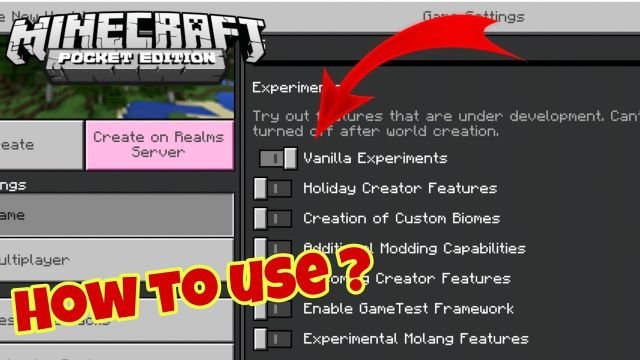
If you are interested in playing with clay and some other blocks in Minecraft, then you will surely love the Vanilla Experiments feature on Minecraft. So, if you eagerly want to know about the Vanilla Experiments on Minecraft, we recommend you read this blog until the end. As the blog has covered the required details about what is Vanilla Minecraft in the Game Minecraft or How to Turn Vanilla Experiments on Minecraft?
What are Vanilla Experiments in Minecraft?
Vanilla Experiments are basically public servers for Minecraft. Moreover, Vanilla Experiments are just like snapshots but only work in the Beta Bedrock version of the game. The best thing about Vanilla Experiments is that it lets you get to know about the features that are still not available in the game yet. Vanilla Experiments is a choice; therefore, you can use it in several ways you want.
How to Turn Vanilla Experiments on in Minecraft? (2 Easy Ways)
There are two ways through which you can turn on Vanilla Experiments in Minecraft like:
How to Turn Vanilla Experiment on in Minecraft by Creating a World? (3 Easy Steps)
Below are the steps to turn on Vanilla Experiments in Minecraft by creating a new world:
Step 1: In order to make a world, just open the game setting and scroll down to the experiments section
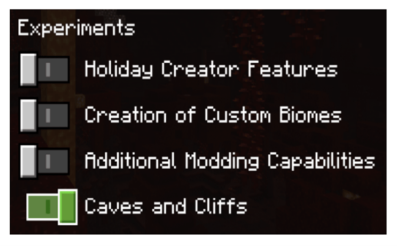
Step 2: Now, in the experiments section, click on the Vanilla Experiment option
Step 3: Lastly, you will get a popup warning that warns you that your world might crash or break or even will not work with future updates. So, if you are okay with this warning, then click on activate Vanilla Experiment

How to Turn Vanilla Experiment on in Minecraft by Editing the Existing World? (5 Easy Steps)
Below are the steps to turn on Vanilla Experiments in Minecraft by editing the existing world:
Step 1: In order to edit the existing world, go to the game setting and click on the pencil icon on the right side

Step 2: Now, scroll down to the setting section of the game and figure out the experiment option
Step 3: Next, when you receive the warning popup then, choose the activate experiment option
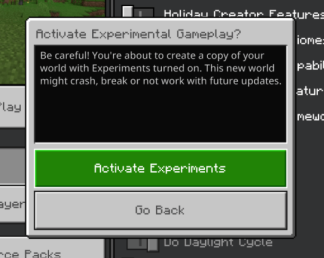
Step 4: As this is an existing world, it will begin to make a copy of the world in order to add the experimental feature. So, you can find the new world with this feature under the name “Copy of“, followed by your world’s name in which you enabled experiments. For instance, if your world was “The World“, then a copy would be named “Copy of The World.”
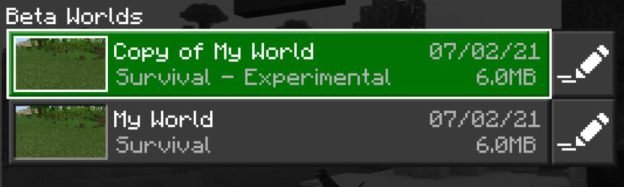
Step 5: It is worth mentioning that you cannot change your experimental world to a non-experimental world
How Many Experimental Features are Available in Minecraft Bedrock Edition?
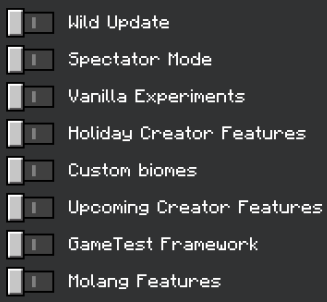
Below are the Experimental features available in Minecraft Bedrock Edition:
Minecraft Bedrock Edition Toggles | Features |
The Wild Update | It is under development and planned to release in The Wild Update. |
Spectator Mode | Spectator Mode enables an early and underdeveloped version of Spectator Mode. |
Vanilla Experiments | Vanilla Experiments includes experimental game features that are still under development for future Minecraft updates. |
Holiday Creator Features | It is a data-driven block and item features. |
Custom Biomes | Custom Biomes show parameters for biome generation to creators, allowing them to make unique biome configurations. |
Upcoming Creator Features | It is an experimental feature that includes actor properties along with fog volumes. |
GameTest Framework | GameTest Framework allows makers or creators to validate their worlds and add-ons in Minecraft via a series of contained tests. |
Molang Features | Molang Features is a new container for Molang experimental queries and language features that are not tied to other experimental toggles. |
Conclusion
Vanilla Experiments are public servers for Minecraft. It is s like snapshots but only works in the Beta Bedrocgame version. Vanilla Experiments lets you know about the features still unavailable in the game. The blog has covered all the required details about Vanilla Experiment on Minecraft and how to turn Vanilla Experiment on in Minecraft. Do not forget to check out our website Qnnit for more informative blogs.

![All Call Of Duty Games In Release Order(CoD)(UPDATED) [%currentmonth% %currentyear%] - Qnnit](https://qnnit.com/wp-content/uploads/2022/10/Call-of-Duty-1-e1537810873208-1.jpg)


