Introduction
Foreground sync is a functionality employed by certain applications on Android devices to maintain real-time connections with their servers, thereby providing real-time updates to the user. This mechanism is primarily used while the application is actively in use or in the ‘foreground’. It plays a vital role in many types of applications, from instant messaging and email clients to music streaming and GPS navigation systems.
What is Foreground Sync?
Foreground Sync is a service feature primarily used in Android operating systems, which allows applications to execute some processes or maintain connections while they’re active and in the “foreground” of the device. This feature has been designed to make sure that real-time and time-sensitive tasks such as instant messaging, video calls, GPS services, music streaming etc., aren’t interrupted by the system, even when the device is under heavy load or trying to save power.
A common characteristic of these foreground services is that they generally display a persistent notification to inform the user that the service is running. For example, when you’re playing music on Spotify and minimizing the app, you will still see a notification showing the music is playing. This is a foreground service in action.
Should you Leave Foreground On or Off?
Whether to keep the foreground services on or off depends on a variety of factors, such as:
The Nature of the Application
Foreground services are critical for certain types of applications to function as intended.
Battery Life Considerations
Foreground services can increase the battery usage of your device because they keep certain parts of an app active even when you’re not directly using it. This can be particularly impactful if you use several apps that rely heavily on foreground services or if one of these apps is poorly optimized and uses more battery than necessary.
Some considerations you might want to keep in mind:
Privacy and Security Considerations
Keeping applications running in the Foreground can potentially have privacy implications. Here’s why:
Examples of Apps that Use Foreground Services
Several apps make use of foreground services to deliver an uninterrupted user experience. Here are a few examples:
Should you Enable or Disable Foreground Sync Under Notifications?
The choice of enabling or disabling Foreground Sync depends primarily on the user’s needs and preferences. Here’s a breakdown of when you might want to enable or disable it:
How do Background Syncs Work?
Background Sync is a web API that lets you defer actions until the user has stable connectivity. This is useful for ensuring that whatever the user wants to send is actually sent. This API allows web applications to defer server synchronization tasks to the point where the device has a network connection. It’s particularly useful for enabling reliable, user-resilient experiences when a device’s network connectivity is intermittent or unreliable.
For example, when a user tries to post a comment on a blog but goes offline before the data is posted to the server, the data could be lost. With background sync, the browser will keep trying to post the comment until it succeeds, even after the user has closed the page or even the browser, improving the reliability of the web app.
What are the Benefits of Background Syncs?
Background Sync has several benefits:
How Can I Enable Background Syncs?
Here’s a general way to register for a background sync in service worker:
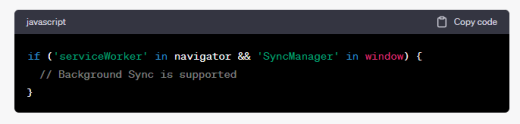
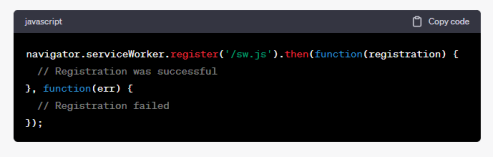
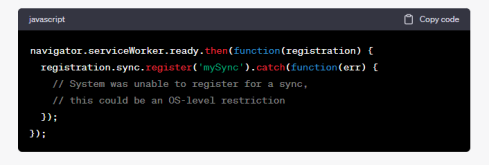
Note: The above is a simple example of registering for a background sync. Depending on the complexity of your application, implementing background sync might be more complex. You’ll also need to handle the sync event in your service worker script.
Remember, while background sync improves the reliability of web applications and is generally a positive feature, it’s important to consider privacy and data usage concerns. Users might not want their device to use data for sync when they’re not actively using your app. Always try to make your use of background sync transparent to users and respect their preferences.
Foreground Syncs in Android
Foreground sync is a term that typically refers to the process by which certain apps, once opened and running in the “foreground” of your device, maintain connections and sync data in real-time, rather than waiting until you’re not using the device or when the app is running in the “background”.
How Do Foreground Syncs Work?
Foreground syncs work by keeping active connections to servers or other devices while an app is in the Foreground of your device. This allows the app to fetch, send, or sync data in real–time, ensuring that the data in the app is as current as possible. Here’s a step-by-step breakdown:
Benefits of Foreground Syncs
Foreground syncs offer several benefits:
How to Enable Foreground Syncs
Foreground sync is usually enabled by default on apps that require it. However, if an app has options for how it syncs data, you may be able to control this in the app’s settings. Here’s a general way to do it:
Please note the process will vary from app to app, and not all apps offer control over how they sync data.
Foreground Syncs and Notifications
Notifications in Android play a key role in the foreground sync process. Persistent notifications are typically used to indicate that an app is running a foreground service and syncing data. This is a requirement from Android to ensure transparency to the user about ongoing processes.
For example, a music streaming app may show a persistent notification with controls for the current track. This notification indicates that the app is running a foreground service to stream music and control playback.
Foreground syncs can also generate standard notifications. For instance, a messaging app running a foreground service to sync messages in real time may generate notifications for incoming messages. These notifications can be interacted with, dismissed, or managed in the settings of the app or the device.
Remember, while foreground sync services are necessary for real-time data processing, they may consume more power and data. So it’s important to manage these settings based on your device’s capabilities and your data plan.
What are Some of the Downsides to Foreground Syncs Notifications?
Foreground syncs and the associated notifications have numerous benefits as detailed above, but they also come with some downsides that should be considered:
Remember that while these downsides exist, foreground syncs are still crucial for many apps to function correctly. The key is to manage your apps wisely, understand which ones need to use foreground services and which ones do not, and adjust your settings accordingly.
How do I Get Rid of Foreground Sync Notifications?
Foreground sync notifications are typically associated with apps that are running ongoing tasks in the Foreground, such as music streaming, GPS navigation, or file downloads. Android requires these apps to display a persistent notification to let the user know that these tasks are happening.
Here’s how you can manage these notifications:
However, it’s important to note that persistent notifications for foreground services are there for a reason. They inform you about ongoing processes that could be consuming battery, data, or other resources, and they often provide useful controls or information about these processes. Before removing these notifications, consider whether you want to lose this information and control.
What are Foreground Apps?
Foreground apps refer to applications that are currently active and in use on a device. When an app is in the Foreground, it means that it’s open and occupying the screen, and the user is actively interacting with it.
Foreground apps have certain privileges that background apps do not. For example, they have:
Once you switch to a different app or return to your device’s home screen, the app you were using goes into the background. Background apps may continue some activities, like playing music, but they usually have restrictions to save resources and battery life. They may also be paused or stopped by the system to free up resources.
What are the Best Foreground Sync Apps?
Several apps make excellent use of foreground sync capabilities to deliver real-time, interactive experiences to users. Here are some of the best examples:
Messaging Apps
Email Clients
Music and Video Streaming Apps
Social Media Apps
Navigation Apps
Fitness and Health Tracking Apps
Remember, while these apps provide great user experiences thanks to foreground sync, they can also consume more battery and data than other apps. It’s a good idea to keep an eye on your usage and adjust settings as needed.
Pros and Cons
Here are some of the prominent pros and cons:
Pros of Foreground Sync
Cons of Foreground Sync
FAQs
Here are the FAQs:
Q1. What is foreground sync Samsung messages?
Ans. Foreground sync in Samsung messages refers to the app maintaining a real-time connection to the server to send and receive messages instantly when the app is active and in use.
Q2. How do I enable foreground sync Samsung messages?
Ans. Usually, foreground sync is enabled by default in messaging apps like Samsung Messages. If there’s an option to change this, you will find it within the app settings. However, Samsung Messages doesn’t offer an explicit option to disable/enable foreground sync as of my knowledge cutoff in September 2021.
Q3. What is background message syncing?
Ans. Background message syncing refers to an app fetching and sending messages even when it’s not actively in use or is running in the background. This ensures you receive new messages promptly, even if you don’t have the app open.
Q4. How to stop background running apps on Android?
Ans. To stop background running apps on Android, you can go to your device’s settings, navigate to the “Apps & notifications” section, and select the app you want to stop. Then tap on “Force Stop”. Please note stopping apps can cause them to misbehave and should only be done if necessary.
Q5. Should I turn on foreground syncs?
Ans. If an app requires real-time data updates, such as a messaging or email app, then keeping foreground sync on is beneficial. However, it can use more battery and data, so if those are concerns, you may want to limit its use.
Q6. What is a foreground service?
Ans. A foreground service is a service that performs operations while the user is actively interacting with the app. Foreground services continue running even when the user isn’t directly interacting with the app. They’re used for operations that should not be interrupted, like playing music or a file download.
Q7. What are some benefits of using foreground services?
Ans. Foreground services are beneficial for providing uninterrupted services (like music playback or GPS navigation), delivering real-time updates (like instant messages or emails), and generally ensuring a smooth, interactive user experience.
Q8. What is the foreground activity in Android?
Ans. In Android, the foreground activity is the activity currently at the top of the activity stack that the user is actively interacting with. It’s the app that’s currently on screen and in use.
Q9. What is an example of a foreground activity?
Ans. If you’re currently using a messaging app to send a text, that app is the foreground activity. If you switch to a map app for navigation, that map app becomes the foreground activity.
Q10. What is Foreground in art?
Ans. In art, the Foreground refers to the part of a scene or image that appears closest to the viewer. It’s typically at the bottom of a composition and is often more detailed and larger in scale than the middle ground and background elements.
Q11. What are some examples of Foreground in art?
Ans. In a landscape painting, a tree or a rock formation in the front of the painting would be considered the Foreground. In a portrait, the person being portrayed is often in the Foreground.
Q12. What are foreground syncs in WhatsApp?
Ans. Foreground syncs in WhatsApp refer to the app maintaining a real-time connection with its servers to send and receive messages instantly while the app is active and in use.Top of Form
Conclusion
Foreground sync is a powerful tool in the Android ecosystem that allows apps to provide real-time updates, uninterrupted services, and an overall improved user experience. Apps like messaging services, email clients, navigation apps, and music or video streaming platforms greatly benefit from foreground sync, allowing them to function optimally and enhance user engagement. It is pertinent to mention that you may learn more about such subjects at Qnnit.com.
Ultimately, the choice to enable or disable foreground sync will depend on individual user needs and preferences. Balancing the real-time functionality and resource consumption of foreground services can help optimize your device’s performance and overall experience.