What is OMA Client Provisioning? Details and Troubleshoots

What is OMA?
The full form of OMA is Open Mobile Alliance. It is a mobile specification resource organization that facilitates mobile service interoperability around the world. OMA has been contributing to the growth of the mobile market through the quick adoption of mobile data and communication standards, besides entertainment.
OMA works on the principles that are derived from SyncMLInitiative, Wireless Application Protocol (WAP), Mobile Gaming Interoperability Forum (MGIF), Open Mobile Architecture Initiative (OMAI), and Location Interoperability Forum (LIF), Mobile Wireless Internet Forum (MWIF). It is worth mentioning that regarding interoperability problems, OMA also collaborates with organizations like Consumer Electronics Association (CEA), CalConnectSM, 3GPP, etc.
What is OMA Client?
The OMA Client stands for Open Mobile Alliance Client. It is a standard mode of operation whose aim is to help the carrier provider to provide the latest network settings updates, including APN Settings, Network configuration, GPRS settings, Sim toolkits, MMS servers, browser homepage, Proxy, etc.
What is OMA Client Provisioning?
OMA Client Provisioning is a standard mode of operation through which mobile operators can send network settings to consumers in the form of special SMS messages. Moreover, these network settings are sent via OMA Client Provisioning that include:
- Proxy
- Access Points
- SIM Toolkits
- MMS Server
- APN Settings
- GPRS Settings
- Browser Homepage
- Network Configuration
The above network settings are sent via OMA Client Provisioning to new devices that are joining the mobile operator’s network on their device. The end user gets OMA Client Provisioning messages every time a new device is connected to a mobile operator’s network or when the operating company changes its internal systems that must be updated on the user’s mobile network.
It is vital to mention that big companies mostly use the standard to organize company-wide email or web proxy settings to all devices of the employees so that internal email accounts or intranet portals are accessible by the employees of the firm. So, in short, OMA is a system-level program that works as a link between your phone and your wireless carrier’s network.
Why is OMA Client Provisioning Important?
Below are the reasons why is OMA Client Provisioning Important:
- OMA Client Provisioning allows your SIM card to make calls
- OMA Client Provisioning enables your SIM card to access the Internet easily
- It allows your SIM card to send messages or even MMS
- OMA Client Provisioning further enables you to adjust and configure network settings the way you want
How to Disable OMA Client Provisioning Message? (6 Easy Steps)
Below are the steps to disable OMA Client Provisioning Message:
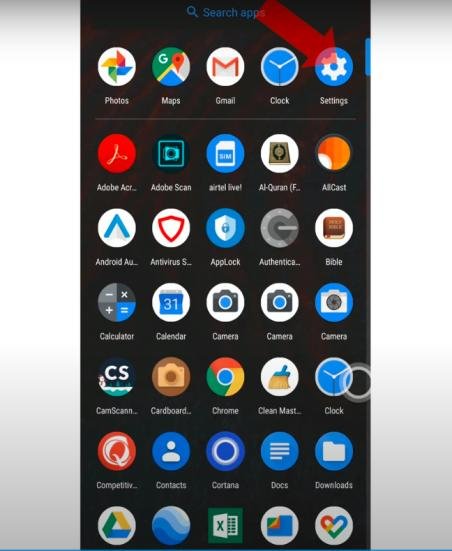
Step 1: First, just go to Settings on the Android device
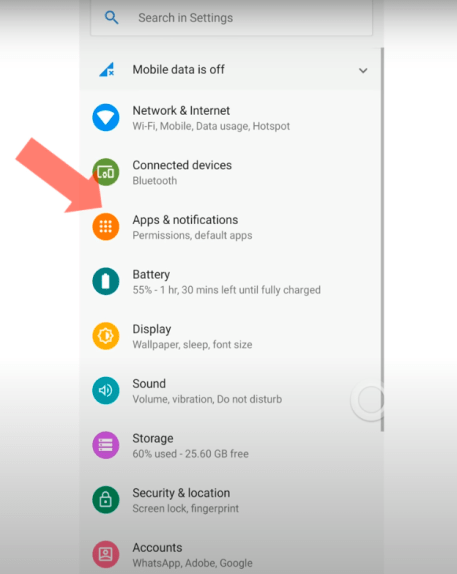
Step 2: Now, make sure to open apps and notifications
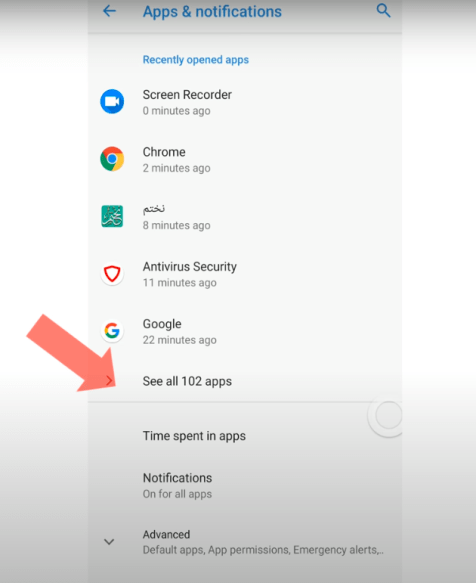
Step 3: Next, make sure to click on 3 dots in the top right corner in order to open the drop-down menu and then choose Show All Apps
Step 4: Make sure to choose show system settings by just opening the drop-down menu from the top right corner again
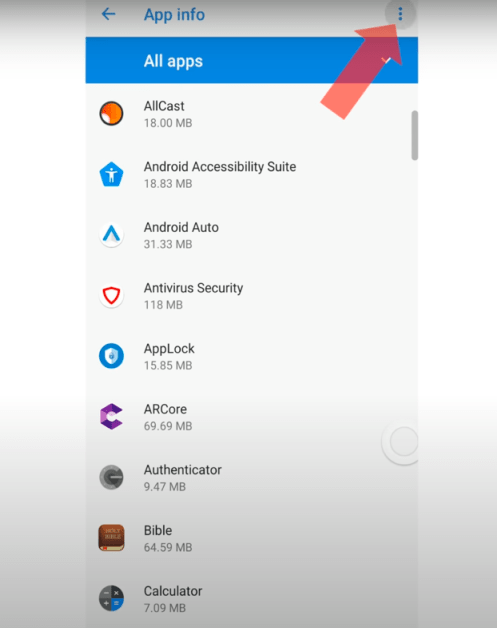
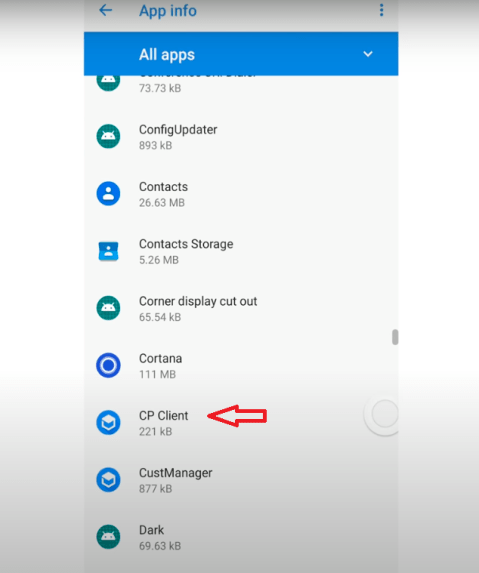
Step 5: Now, scroll down through the list in order to find CP Client and then click on it to open
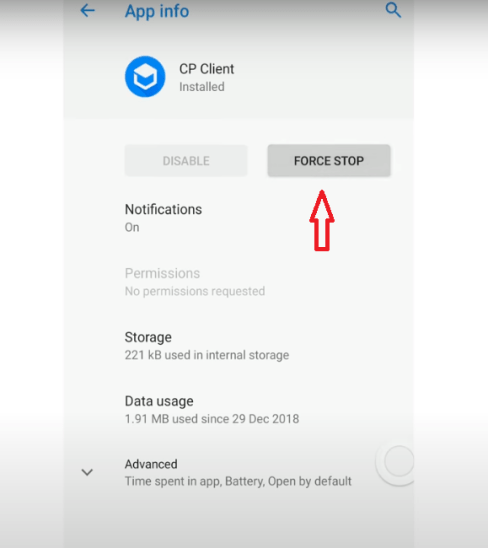
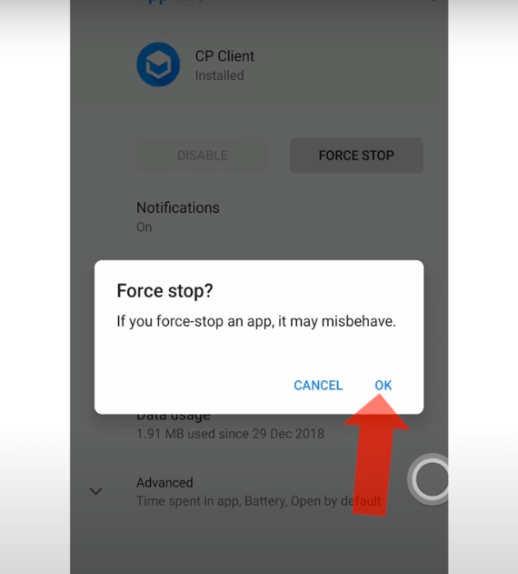
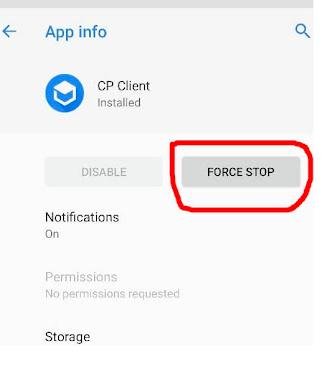
Step 6: Lastly, click on Force Stop in order to disable the CP Client Provisioning Message and notification
Is OMA Client Provisioning Safe?
Yes, OMA Client Provisioning is quite safe as the OMA Client Provisioning notification you have received on your device comes from the original mobile operator you are a user of. Despite this, it will be better if your phone already adds an extra layer of security to allow only authenticated OMA Client provisioning on your device.
Sometimes an OMA Client Provisioning message you get on your device could be a rogue or fake. Therefore, be careful of these rogue or fake OMA Client Provisioning messages that could be very dangerous. If interacted with, they are potent for launching credible phishing attacks on your device by attackers online.
How to Delete an OMA Client Provisioning Message? (5 Easy Steps)
Below are the steps to delete OMA Client Provisioning Message:
Step 1: In order to delete OMA Client Provisioning Message, go to the Setting and then go to the Apps & Notifications section

Step 2: Now, click on the 3-dots symbol in the top right area, then “Show system”

Step 3: Next, from the drop-down option that displays, choose “OMA Client Provisioning”
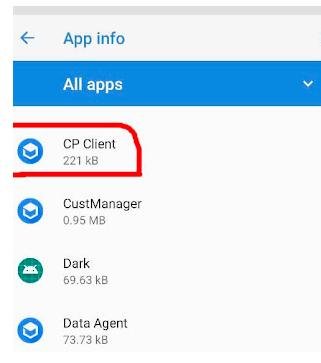
Step 4: Make sure to choose “Force Stop” and confirm, then choose “Storage” and “Clear data” from the menu

Step 5: Lastly, turn off your device and then restart it
How to Prevent OMA Client Provisioning Notifications From Popping Up?
Below are the steps to prevent OMA Client Provisioning notifications from popping up:
Step 1: In order to enable notifications, make sure to go to the Notification section of the CP Client app window setting
Step 2: Now, make sure to choose General Notifications from the drop-down menu
Step 3: Next, choose the behavior from the drop-down menu
Step 4: Lastly, choose show quietly and minimize from the pop-up window that appears
Note: This way will not prevent CP Client notifications from being received. However, it will prevent them from annoying you.
Frequently Asked Questions (FAQs)
Below are the FAQs about What is OMA Client Provisioning? Details and Troubleshoots:
Q1: How do I stop OMA client provisioning?
Ans: You cannot directly stop OMA client provisioning. However, you can ignore or delete the provisioning messages.
Q2: Why do I keep getting provisioning messages?
Ans: You may be getting provisioning messages due to a change in your network’s settings or due to a software update.
Q3: What is OMA on my phone?
Ans: OMA refers to a set of standards for mobile devices and services developed by the Open Mobile Alliance.
Q4: Is the provisioning Message safe?
Ans: Provisioning messages are generally safe, but always verify the source before accepting them.
Q5: Should I accept OMA client provisioning?
Ans: You should accept OMA client provisioning if it comes from a trusted source, like your mobile operator.
Q6: How do I remove Omadm from my phone?
Ans: Omadm is a device management tool and typically cannot be removed without root access.
Q7: What is the purpose of provisioning?
Ans: Provisioning involves setting up a device with the necessary settings to connect to a network or service.
Q8: What does it mean when your phone is provisioning?
Ans: When provisioning, your phone receives and applies configuration settings.
Q9: How do I stop new provisioning messages?
Ans: You cannot directly stop new provisioning messages. You can ignore or delete them.
Q10: What is OMA used for?
Ans: OMA (Open Mobile Alliance) develops open standards for the mobile phone industry.
Q11: What is OMA Client Provisioning on my Motorola phone?
Ans: OMA Client Provisioning app on your Motorola phone is text messages with network settings and files for configuration.
Q12: What is an OMA configuration?
Ans: The full form of OMA configuration is Open Mobile Alliance.
Q13: Is the provisioning message app safe
Ans: The OMA client provisioning app is completely safe and secure.
Q14: What is an OMA-DM client?
Ans: OMA-DM client is one of the easiest ways to manage your mobile’s network data.
Q15: I am receiving OMA Client provisioning Message; what should you do?
Ans: in order to protect your device from phishing attacks by the OMA Client Provisioning virus, it is better not to open the Message. Moreover, you can request the original configuration message by sending a text message or use USSD in order to get network configuration.
Conclusion
OMA Client Provisioning is basically a system-level application whose aim is to serve as a link between your device and your wireless carrier network. Moreover, OMA Client Provisioning is a standard mode of operation used by the network carrier provider in order to send the network configuration settings to the device while setting up the new sim card.