

Have you got your hands on a brand new Apple Watch, which leads you to question if a data plan is a must? Here is the right place to find out whether you can enjoy the full potential of your Apple Watch without the need for a data plan or not.
Apple is a multinational technology company with headquarters in Cupertino, California. It designs, manufactures, and markets a wide variety of consumer gadgets, including wearables, smartphones, laptops, tablets, and accessories.
Apple has established a name for itself as one of the top technological businesses in the world because of its widespread presence. Apple keeps developing and releasing new products, with a focus on growing its collection of Apple Watches. Since its initial release, the Apple Watch has grown in popularity, and Apple has been releasing new models and features to meet user demand.
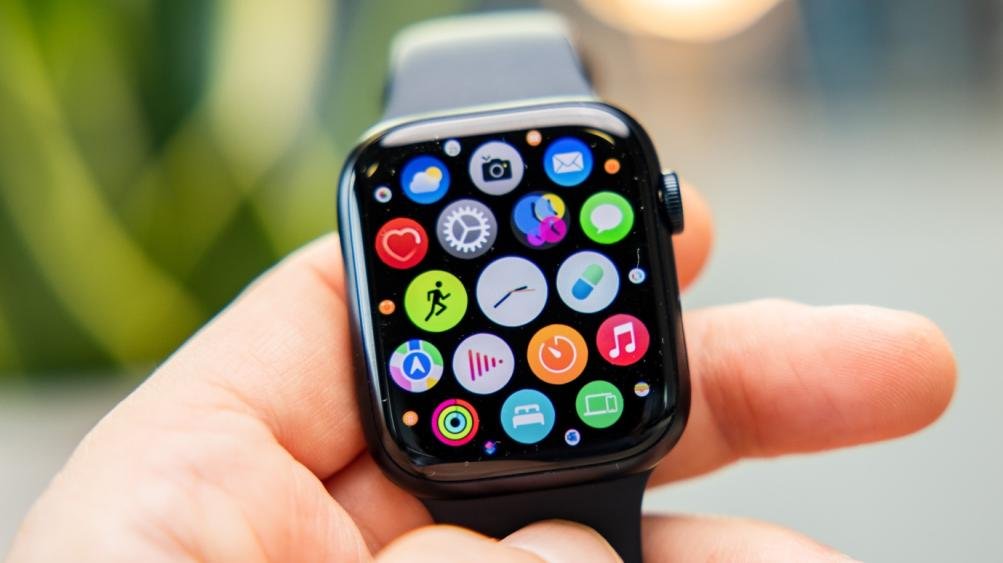
In this article, we’ll look at the Apple Watch’s features and determine whether it requires a separate data plan by considering its connectivity options, cellular capabilities, and Apple’s requirements.
Apple Watches
Apple Watches are smartwatches that combine the elegant design of a classic watch with advanced technologies. Apple Watches offer a wide range of functions, from fitness tracking and health monitoring to communication, work, and entertainment to enhance the user experience. Apple Watches have been a popular choice for consumers looking for an attractive wearable companion because of their sleek designs, easy interfaces, and connectivity with iPads, iPhones, and Macs.
Here are few notable series or versions of Apple Watches:
- Apple Watch Series 8
- Apple Watch Series 7
- Apple Watch SE
- Apple Watch Series 6
- Apple Watch Series 3
Connectivity Options of Apple Watches
Connectivity on the Apple Watch plays a vital role in its functionality and capabilities. The Apple Watch offers multiple connectivity options, allowing users to stay connected and access various features:
iPhone Connectivity
The Apple Watch is designed to seamlessly connect with an iPhone. It utilizes Bluetooth technology to establish a connection, enabling the watch to receive notifications, make calls, send messages, and access internet services when the iPhone is nearby.
Wi-Fi Connectivity
When connected to a Wi-Fi network, the Apple Watch can access internet services, receive notifications, and use apps even if the iPhone is not within Bluetooth range. This provides additional flexibility and independence.
GPS Functionality
All Apple Watch models come equipped with GPS capabilities. This enables accurate location tracking, fitness tracking, and navigation features without the need for a data connection.
Cellular Connectivity (GPS + Cellular models)
The GPS + Cellular versions of the Apple Watch offer independent connectivity through cellular networks. They possess a built-in cellular chip that enables the Apple Watch to connect to cellular networks. With a compatible data plan, the watch can make calls, send messages, stream music, access apps, and receive notifications even without an iPhone or Wi-Fi network nearby.
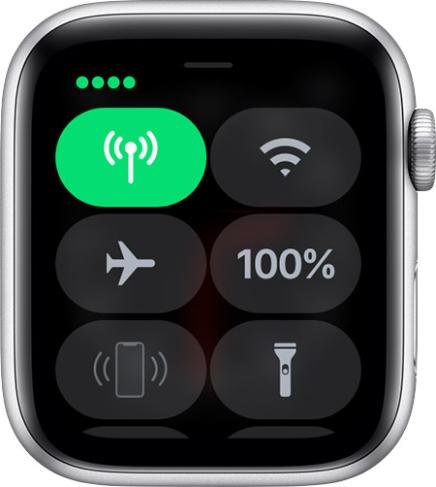

These connectivity options ensure that, only while using the GPS + Cellular Apple Watch, a data plan becomes necessary to fully utilize its independent cellular connectivity.
What is Data Plan and its Subscription?
A data plan refers to a cellular service subscription specifically for Apple Watches with GPS + Cellular capabilities. This subscription allows the Apple Watch to connect directly to cellular networks, enabling independent data access and communication without relying on a paired iPhone or Wi-Fi network.
By subscribing to a data plan for your GPS + Cellular Apple Watch, you gain the ability to make and receive calls, send messages, access data services, stream music, use apps, and receive notifications directly on your watch, even when your iPhone is not nearby. The data plan provides the necessary cellular connectivity to unlock the full potential of your GPS + Cellular Apple Watch, granting you the freedom to stay connected and access various features and services on your wrist-worn device.
Here are some data plans for Apple watches:
Verizon Apple Watch Data Plan
Compatibility
Verizon’s Apple Watch Data Plan is compatible with Apple Watches that have GPS + Cellular capabilities. This plan allows you to activate cellular service on your Apple Watch, enabling independent data connectivity without relying on your iPhone or Wi-Fi.
Pricing
The pricing for the Verizon Apple Watch Data Plan is an additional $10 per month on top of your existing Verizon wireless plan. This fee covers the data usage and connectivity provided to your Apple Watch.
Data Allowance
With the Verizon Apple Watch Data Plan, you get unlimited 5G nationwide data on your Apple Watch. The first 15GB of data is considered premium data, which is more than sufficient for the majority of Apple Watch users. After exceeding the 15GB threshold, your speeds may be reduced to 600 KBPS, which is still ample for most Apple Watch functionality.

AT&T Apple Watch Data Plan
Compatibility
The AT&T Apple Watch Data Plan is designed for Apple Watches with GPS + Cellular capabilities. This plan enables you to connect your Apple Watch to the AT&T network, granting you independent cellular connectivity for data usage and communication on your watch.
Pricing
For AT&T customers with an existing unlimited plan, adding an Apple Watch to your plan costs an additional $10 per month. This add-on fee allows your Apple Watch to access the same unlimited data as your phone. However, if you have a non-unlimited plan, the pricing for adding an Apple Watch plan will differ, and it’s advisable to consult with AT&T for specific pricing details.
Data Allowance
AT&T’s data plan for Apple Watches typically provides unlimited data usage on your watch when added to an unlimited plan. However, the exact data allowance for non-unlimited plans may vary based on your specific plan details. It’s important to confirm with AT&T regarding the data allocation for your Apple Watch.

T-Mobile Apple Watch Data Plan
Compatibility
T-Mobile offers a data plan specifically tailored for Apple Watches with GPS + Cellular functionality. This plan allows you to activate cellular service on your Apple Watch and enjoy independent data connectivity on the T-Mobile network.
Pricing
The pricing for the T-Mobile Apple Watch Data Plan may vary based on the specific plan and bundle options available. It’s recommended to consult with T-Mobile directly or visit their website to get the accurate pricing details for adding an Apple Watch to your T-Mobile plan.
Data Allowance
The data allowance provided with the T-Mobile Apple Watch Data Plan will depend on the specific plan and package you choose. T-Mobile offers various data plans with different data allowances, and you can select the one that best fits your usage needs and preferences for your Apple Watch.

Important Considerations while Getting a Plan for your Apple Watch
When selecting a cellular plan for your Apple Watch, there are a few key factors to consider:
Activation Fees
Keep an eye out for activation fees associated with adding a cellular plan for your Apple Watch. These fees can vary among carriers and may change over time. For example, AT&T typically has an activation fee of around $25, while Verizon reportedly has an activation fee ranging from $20 to $40. It’s worth checking with your carrier to determine the specific activation fee for your situation. Some carriers may offer in-store discounts or promotions to lower the activation fee.
Pricing and Options
Most carriers offer a $10 per month plan for adding an Apple Watch to your existing cellular plan. However, it’s important to clarify whether this price includes the activation fee or if it is an additional cost. Ensure you understand the pricing structure and any additional charges associated with the plan. Comparing the pricing and options across different carriers can help you find the most cost-effective solution for your Apple Watch.
Compatibility with your Carrier
Before committing to a cellular plan for your Apple Watch, verify if your current carrier supports smartwatches or offers specific plans for Apple Watches. Adding the Apple Watch to your existing carrier is generally a more convenient and cost-effective option. However, if your carrier does not provide a suitable plan, switching carriers may be worth considering to ensure compatibility and potentially save money.
Benefits of Cellular Connectivity on an Apple Watch
Cellular connectivity on an Apple Watch brings a host of benefits, transforming it into a powerful standalone device. With the ability to make calls, send messages, access data services, and more directly from your wrist, the Apple Watch becomes a versatile companion that keeps you connected wherever you go.
Independent Functionality
With cellular connectivity, your Apple Watch can function independently of your iPhone. You can make calls, send messages, and access data services directly from your watch, even if your iPhone is not nearby. This allows for greater flexibility and convenience, especially during workouts, outdoor activities, or when you prefer to travel light without carrying your phone.
Stay Connected Anywhere
Cellular connectivity ensures that you stay connected wherever you have cellular coverage. Whether you’re out for a run, at the beach, or in a location without Wi-Fi, you can still make calls, send and receive messages, and access data services on your Apple Watch. This constant connectivity keeps you in touch with important information and loved ones, enhancing your overall communication experience.
Emergency Assistance
Cellular connectivity can be crucial in emergency situations. If you encounter an emergency and your iPhone is not accessible, you can still use your Apple Watch to make emergency calls. It allows you to reach emergency services, share your location, and seek help when needed, providing an added layer of safety and peace of mind.
Fitness and Activity Tracking
Cellular connectivity enhances the capabilities of your Apple Watch for fitness and activity tracking. You can stream music or podcasts directly to your watch during workouts, receive real-time fitness metrics, and stay connected to fitness apps and services. This allows for an uninterrupted experience without relying on your iPhone or Wi-Fi connectivity.
Convenience on the Go
With cellular connectivity, you can access various apps, services, and information on the go. You can receive notifications, check emails, control smart home devices, use maps for navigation, and more, all directly from your Apple Watch without needing your iPhone. This convenience is particularly useful in situations where accessing your phone may not be practical or possible.
Setting Up Cellular Connectivity
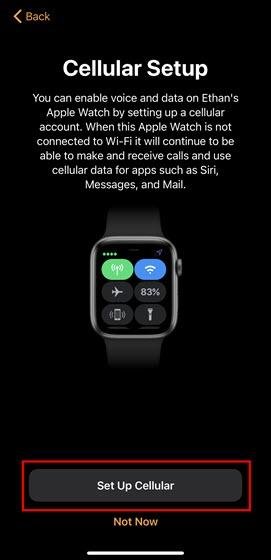
To set up cellular services from your Apple Watch, follow these steps:
Step 1: Open the Apple Watch App on your iPhone and tap on “My Watch.”
Step 2: Tap on “Cellular” and then select “Set Up Cellular.”
Step 3: Follow the instructions provided for your specific network provider.
Step 4: If you need any assistance or have questions during the setup, contact your network provider for support.
FAQs (Frequently Asked Questions)
Q: Can I use my Apple Watch with cellular features internationally?
A: Yes, Apple Watches with cellular functionality can be used internationally if your carrier supports international roaming. However, be aware of potential additional charges and check with your carrier for specific details and coverage.
Q: Can I add an Apple Watch to my existing family plan?
A: Yes, depending on your carrier’s policies, you can typically add an Apple Watch to your existing family plan. This allows you to share the data and cellular services with other devices on your plan, making it a cost-effective option.
Q: Can I stream music or podcasts on my Apple Watch with cellular connectivity?
A: Yes, with cellular connectivity, you can stream music or podcasts directly on your Apple Watch without needing your iPhone nearby. This feature enhances your music listening experience while on the go.
Q: Do all cellular carriers support Apple Watch cellular services?
A: While most major cellular carriers support Apple Watch cellular services, it’s always recommended to check with your specific carrier to ensure compatibility and availability of plans for Apple Watches.
Q: Can I share the same mobile number for my iPhone and Apple Watch?
A: Some carriers allow you to share the same mobile number for both your iPhone and Apple Watch, providing a seamless experience for incoming calls and messages. However, this may vary depending on your carrier’s policies.
Q: Can I use my Apple Watch with multiple cellular carriers?
A: No, Apple Watches are typically locked to a specific cellular carrier. When you purchase an Apple Watch with cellular capabilities, it is tied to a particular carrier and cannot be used with multiple carriers simultaneously.
Q: Can I share my iPhone’s data plan with my Apple Watch?
A: No, the Apple Watch requires its own separate data plan. While some carriers offer bundled plans or options to add an Apple Watch to your existing plan, it typically requires a separate subscription and associated fees.
Conclusion
In conclusion, cellular connectivity on Apple Watches provides increased independence and functionality. With GPS + Cellular models, users can enjoy features like calls, messages, and data services without relying solely on their iPhones. Either activating a data plan or utilizing a connected iPhone, Apple Watches offer a versatile and personalized experience to meet the demands of the user.


