What is SIE PlayStation Network Charge?
Introduction
Welcome to PlayStation, the enchanted land where video game experiences come to life! While all this excitement continues, you might be curious about the mysterious SIE PlayStation Network cost. Don’t worry! We are here to share PlayStation Network thrills with you and to reveal its hidden secrets. Let’s explore the SIE PlayStation Network charge’s magic and open the door to endless gaming possibilities.
What is SIE PlayStation Network Charge?
Your bank statement will show “SIE Network Charges” if Sony Interactive Entertainment (SIE) has assessed a fee for your use of the PlayStation Network (PSN), the company’s online gaming platform. Sony Interactive Entertainment creates game platforms like the PlayStation, PSP, and others.
The PlayStation Network offers several services, such as the PlayStation Plus subscription, which gives access to online multiplayer, free monthly games, and special discounts, for which there may be charges. Depending on your membership or purchase options, these can take place automatically on a monthly or yearly basis.
It is advised to examine your PSN account settings or get in touch with PlayStation customer service for more help if you have any concerns or questions regarding the charges. By doing so, you may obtain a complete breakdown of the costs and ensure you are aware of the services included in the bill.
How to Access PlayStation Network Services?
You need a PlayStation Network account from Sony Interactive Entertainment (SIE) to use the PlayStation Network Service. That’s great that creating an account is free! But here’s the catch: You might need to pay an affordable price each month for certain special items, like PlayStation Plus. It resembles receiving more fun features and surprises.
So, you can find plenty of gaming pleasures with your PSN membership! Play with your friends, find amazing games, and take part in thrilling adventures. Just keep in mind that your PlayStation Network account is the key to gaining access to all the excitement!
How to Set a Default Payment Method?
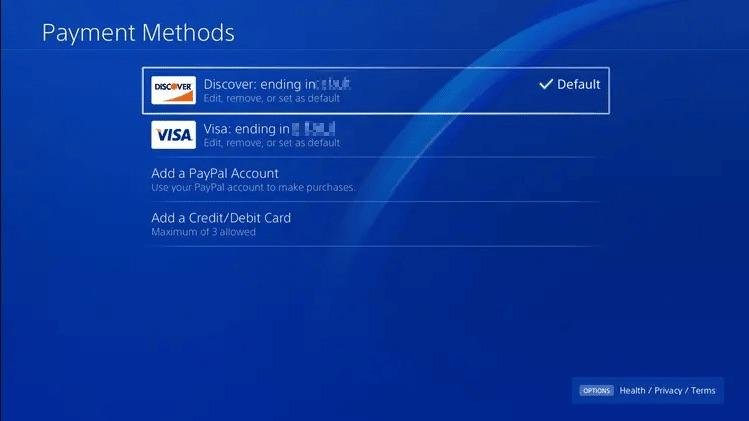
You won’t need to input your payment information each time you make a purchase on PlayStation if you add a default payment method. This makes purchasing games, subscriptions, and other stuff from the PlayStation Store simple and hassle-free. Just make sure your payment information is updated to avoid any problems with your next purchases.
Here’s a step-by-step explanation of how to add a default payment method to your PlayStation account:
Step 1: Turn on your PlayStation console and sign into your PlayStation Network (PSN) account.
Step 2: Now go to the PlayStation Store after signing in.
Step 3: Scroll up to the top menu, where your profile icon is located. Select your profile icon to access the account settings.
Step 4: From the settings, choose “Payment Management.”
Step 5: Next, select “Add Payment Method.” You’ll be given different payment options to choose from.
Step 6: Enter the asked information for the selected payment method.
Step 7: Select “Set as Default” to make this payment method the primary one for future purchases from the given options.
How to Sign Up and Play Without Extra Costs
With PlayStation, you may enjoy playing online games on your PS4 or PS5 without paying the PSN subscription cost. To get started, you only need to create a PlayStation Network (PSN) account. Since there are no additional fees involved, you may engage in thrilling multiplayer experiences. Additionally, you can purchase games straight from the store, get trophies, and more using PSN’s online features without having a PlayStation Plus subscription. What to do is as follows:
Login In
Log in to your account by visiting the PlayStation Network (PSN) and doing so.
Account Settings
Your profile symbol is accessible on the top menu when you scroll up. Click on the profile icon to access “Account Settings.”
PlayStation Plus
Select “Subscriptions” or “PlayStation Plus” from the Account Settings menu.
Manage Subscription
Search for and pick the “Manage Subscriptions” or “Manage Membership” option to manage your subscriptions.
Cancel Subscription
You may cancel your PlayStation Plus subscription by locating it and selecting “Cancel” or “Turn Off Auto-Renewal.” Confirm the cancellation by following the instructions displayed.
Confirm Cancellation
PlayStation may want one last confirmation that you really want to end your membership. Make sure of your choice.
You won’t be charged for the PSN fee anymore once you’ve finished these steps and canceled your PlayStation Plus subscription.
How to Change Payment Mood
Here are the steps to change the payment mood:
Step 1: Enter your PlayStation account information.
Step 2: Then click “Account Settings.”
Step 3: Choose between “Payment Management” and “Payment Methods.”
Step 4: Add your new payment method (such as a credit card or PayPal).
Step 5: Enter the payment information according to the prompts. After saving the changes, you’re done!
Your new payment method is now available for use when making purchases on PlayStation. Enjoy your games without worry!
Frequently Asked Questions
Q1: How much does the SIE PlayStation Network charge cost, and is it a one-time fee?
Ans: The cost of the SIE PlayStation Network charge depends on the service or subscription you choose. It can be a monthly or annual fee for services like PlayStation Plus or the cost of the content you purchase from the PlayStation Store.
Q2: Can I play online games on PlayStation without paying the SIE PlayStation Network charge?
Ans: Certain online games can be played without a PlayStation Plus subscription. They offer free online multiplayer options, allowing users to connect and play with others at no additional cost.
Q3: How do I manage my payment methods and subscriptions on PlayStation?
Ans: You can manage your payment methods and subscriptions through the “Account Settings” section on the PlayStation Network. From there, you can add, change, or cancel payment methods and review your subscriptions.
Q4: Can I still buy games and digital content on PlayStation without the PlayStation Network charge?
Ans: Yes, you can make purchases from the PlayStation Store without a PlayStation Plus subscription. The PlayStation Network charge applies to specific services and subscriptions, not all purchases.
Q5: Are there any discounts or offers available for PlayStation Network subscriptions?
Ans: PlayStation often offers promotions and discounts on PlayStation Plus subscriptions, providing opportunities to save on the subscription fee. Keep an eye on the PlayStation Store for any ongoing deals.
Conclusion
The SIE The PlayStation gaming experience includes the PlayStation Network fee. Access to various services, including online multiplayer, digital game purchases, and unique content, is made possible. While logging into a PSN account is free, some services, like PlayStation Plus, may have a fee.
Through their PlayStation accounts, gamers can simply manage their payments. The PlayStation Network fee opens the door to thrilling gaming journeys, creating connections between users and friends and providing a wealth of entertainment. Gamers must become aware of these fees and the services they receive in exchange.