In today’s digital age, there is an app for everything. An app can be the key to your favorite game, social media account, or even a tool utilized by your phone’s carrier to manage specific features. One such tool is the Carrier Hub app on Android phones.
Have you ever wondered what is Carrier Hub app? Or how to disable Carrier Hub? If not, then read this blog till the end to get yourself updated about it. As the blog Carrier Hub: Things You Need To Know About This App or What Is Carrier Hub? Everything You Need to Know (2023).
What is Carrier Hub App on Android Phones?
The Carrier Hub or Carrier Services is a system app on Android devices provided by carriers like Sprint, Boost, or T-Mobile. Carrier Hub features like Voice over Wifi (VoWi-Fi) allow mobile carriers and their clients to have a closer relationship by directly solving their client requests. Moreover, you can use the app to manage your schedule or busy life by sharing calendars, lists, tasks, or even notes through the Carrier Hub app.
So, when you use the Carrier Hub app, the carrier hub services show notifications on your device’s screen. Furthermore, there are 2 main causes for these notifications: Your T-Mobile network along with the Sprint application are incompatible, or there is a compatibility issue between the new Android version and your device’s carrier hub.
What is Voice Over Wifi (VoWiFi)?
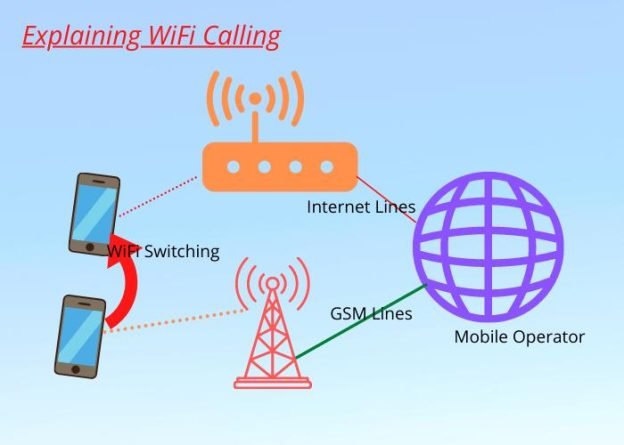
Voice over wifi (VoWiFi) or wifi Calling is a great feature that enables users to easily make voice calls using their wifi connection through Carrier Hub, Skype, etc. The main purpose of the technology is to improve the reach of mobile services for each user, especially in areas where network signals cannot reach. Moreover, now VoWiFi can also help you out in emergencies when your mobile device carrier is down in your area, and you are required to make immediate calls.
What Access Rights does the Carrier Hub App Have?
The carrier hub has access to development tools that enable the app to read sensitive log data, modify secure system settings, and access protected Storage. In addition, the Carrier Hub app has easy access to locations because it uses the internet to provide precise GPS locations.
Carrierhub has access to Storage, enabling you to edit or remove data. The hub has access to calls and the ability to change phone states.
What Permissions does the Carrier Hub App Need?
The Carrier Hub app needs several permissions in order to allow it to work correctly, such as:
1: Location
The location allows the Carrier Hub app to accurately estimate the GPS in order to offer the users the best services based on their location or where they are.

2: Device History
Device History allows the Carrier Hub app to easily access and read sensitive log data and usage data on the user’s device.
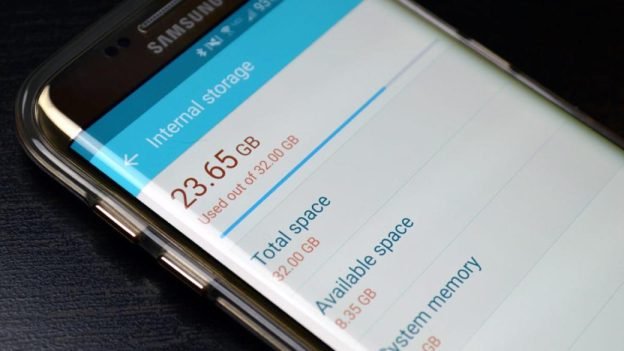
3: Storage
Storage enables the Carrier Hub app to easily access, modify, delete, and even store data on the user’s device storage.
4: Network
The network provides permission to the Carrier Hub app to access and read users’ Bluetooth, wifi, and mobile carrier data logs.
5: Call Information and Device ID
Call Information and Device ID enable the Carrier Hub to easily access the user’s device identity and call history.

Issues Related to the Carrier Hub App
Below are the issues related to the Carrier Hub App:
1: Text and Call Issues
Most of the users are facing call issues, as the call drops suddenly, and they are not able to send or get messages due to network issues. As a result, their calls are dropped or remain undelivered messages.
2: Battery Drainage
Even after updating or downloading the Carrier Hub app, most users reported battery drainage issues. Moreover, the battery charge suddenly drops and does not allow the users to use the device for a long time.
3: Drops in Performance
The drop in performance is one of the users’ biggest issues even after installing the Carrier Hub app. Some of the issues reported such as phone freezing and lagging.
4: Faster Data Depletion
Faster Data Depletion is yet another issue that users face as faster data depletion suddenly increases data consumption after installing the Carrier Hub app. Moreover, the issue might be caused by the app running in the background, resulting in faster data consumption.
5: Alarm Going Off at Random Times
Some users even reported that their alarms went off at random times even after installing the Carrier Hub app.
Why Carrier Hub is Not Responding? (3 Main Reasons)
It is worth mentioning that a mobile network or wifi connection problem can cause the reasons why the Carrier hub app is not responding. Below are the ways to sort out why Carrier Hub is Not Responding
Way 1#: Clearing Cache Data
Below are the steps to clear cache data:
Step 1: In order to clear the cache data, just go to Settings on your device.
Step 2: Now, make sure to click on Apps.
Step 3: Next, just search for the Carrier Hub app.
Step 4: On the following screen, make sure to click on Storage.
Step 5: Lastly, click on Clear Cache.
Way 2#: Force Stop the Application
Below are the steps to force stop the application:
Step 1: In order to force stop the app, just go to Settings on your device.
Step 2: Now, make sure to click on Apps.
Step 3: Next, just search for the Carrier Hub app.
Step 4: Lastly, once you find the app then, click on the force stop option in order to confirm.
Way 3#: Restart your Device
Below are the steps to restart your device:
Step 1: In order to restart your device, just press and hold the power button until and unless you see the Restart option.
Step 2: Now, click on the option and then wait for about 30 seconds for the process to finish.
How to Uninstall Carrier Hub on Android Phones? (2 Easy Ways)
Below are the 2 ways to Uninstall Carrier Hub on Android Phones:
Way 1#: Use ADB (Android Debug Bridge)
You can use the third-party app, Android Debug Bridge, to uninstall the Carrier Hub app if it was preinstalled on your Android device. The app doesn’t require root access to your phone, which is a huge plus.

Below are the steps to uninstall the Carrier Hub App using Android Debug Bridge:
Step 1: First, make sure to go to the Settings section, then go to the system option, and then to the About section.
Step 2: Now, just click on Build number 7 times in order to activate the Developer option.
Step 3: Next, open the Developer options.
Step 4: Once the developer option is opened then, just turn on the USB debugging.
Step 5: After that, download ADB on your device.
Step 6: Now, just extract the Zip file into a folder, and after extracting the file, just open that folder.
Step 7: Make sure to press and hold the shift button and then right-click in a blank area.
Step 8: Now, make sure to click on Open Powershell Window here option and open the ADB device command.
Step 9: Lastly, by using a cable, make sure to connect your Android device to the PC and then run the command.
Way 2#: Use System App Remover
The second method to uninstall the Carrier Hub App using Android Debug Bridge is to use the System App Remover, an app available on Google Play. However, this method needs you to have rooted your device; otherwise, it will not work properly.

Below are the steps to uninstall the Carrier Hub App using System App Remover:
Step 1: In order to use the System App Remover, make sure to go to the App Store.
Step 2: Now, just search for the System App Remover app.
Step 3: Once you found the app. Make sure to download and install it on your rooted device.
Step 4: Now, once it is installed just proceed to open the System App Remover app and type in Carrier Hub to search for it.
Step 5: Next, just click on the Confirm button next to it.
Step 6: Lastly, click on uninstall in order to confirm the process and uninstall the Carrier Hub app completely.
How to Disable Carrier Hub App? (5 Easy Steps)
Below are the 5 steps to disable the Carrier Hub App:
Step 1: First, go to Settings and then click on the Apps option.
Step 2: Now, click on the three vertical dots in the right corner.
Step 3: Next, just click on System Apps.
Step 4: After that, find the Carrier Hub app and then click on it.
Step 5: Lastly, click on the disabled icon in order to disable the Carrier Hub app completely.
What Happens if you Delete Carrier Services?
If you delete or disable Carrier Services, it may impact carrier-specific functionalities like rich messaging and VoWiFi. However, your phone will still be able to make regular calls and texts.
Pro Tips:
Pros and Cons of Carrier Hub App
The Carrier Hub app is amazing for people with limited network coverage in certain locations where they still want to make calls. However, the app still has some disadvantages that might affect your phone’s overall performance.
Below are the pros and cons of the Carrier Hub app:
Carrier Hub Pros
1: Voice over wifi (VoWiFi) feature: The main feature of the Carrier Hub app is its VoWiFi function, which increases your network coverage and enables you to make calls via a wifi connection
2: Data usage tracking: The Carrier Hub also tracks your data usage in order to detect any network problems and help you resolve them. Depending on your carrier, it also helps the T-Mobile or Sprint technical support teams
Carrier Hub Cons
1: High-battery Consumption: While using the Carrier Hub app, many users have noticed a fast decrease in their battery. Therefore, the users have reported that the Carrier Hub displayed high consumption on their phone’s battery optimization feature
2: Increased Data Usage: VoWiFi is a superb feature when you have limited network signal access in your home. However, it can consume more data, especially when making long calls
3: Bugs in the App: The other cons of the Carrier Hub app are the bugs when using the app, including freezing and sudden app crashes. Moreover, the app also affected users’ smartphone’s overall performance, even when it was just running in the background
Frequently Asked Questions (FAQs)
Below are the FAQs about what is Carrier Hub App, and how do I uninstall it:
Q1: What is the Carrier Hub app used for?
Ans: The Carrier Hub app manages and enhances specific features of your Android device, such as VoWiFi, data connectivity, and battery optimization.
Q2: Can I uninstall the Carrier Hub app?
Ans: The Carrier Hub is a system app and cannot be completely uninstalled without root access. However, you can disable it.
Q3: Is it safe to disable the Carrier Hub app?
Ans: While it’s generally safe to disable the app, doing so may impact certain features on your device that the app manages.
Q4: Is the Carrier Hub app a spy app?
Ans: Although the Carrier Hub app has significant access to your device’s systems, it’s not a spy app. It’s a tool used by carriers to manage specific services and features.
Q5: Do I need the Carrier Hub app?
Ans: The Carrier Hub app enhances certain features of your device. While it’s not crucial for your phone’s basic functionality, it can improve some carrier-specific features.
Q6: Is the Carrier Hub App a virus or malware?
Ans: Carrier Hub App is neither a virus not even malware. Moreover, Carrier Hub is a preinstalled app on your Android device or downloadable through Google Play. So, in short, Carrier Hub App has been verified as a safe app to download; therefore, you can install and use the app.
Q7: What does MCM Client Requests Processing mean?
Ans: MCM (Mobile Content Management) Client Requests Processing is a function of the Carrier Hub app. It helps manage how your phone processes and handles mobile data and wifi connections.
Q8: What does Voice Over Wifi do?
Ans: Voice over wifi (VoWiFi) allows you to make and receive calls over a wifi network when cellular networks are not available or are weak, ensuring uninterrupted communication.
Q9: Is it safe to uninstall Carrier Hub?
Ans: Since the Carrier Hub is a system app, uninstalling it might affect some features and services of your device. It’s generally safe to disable it, but complete uninstallation without proper technical knowledge can lead to unexpected issues.
Q10: What is the Hub App used for?
Ans: The Hub app, like the Carrier Hub, is typically used for managing specific features and functionalities of the device or services provided by the carrier.
Q11: Can I uninstall Google Carrier Services?
Ans: Google Carrier Services is a system app that enhances carrier functionality like rich messaging and network prioritization. Like the Carrier Hub, it can be disabled but not uninstalled without root access.
Q12: Do I need Carrier Services app?
Ans: The Carrier Services app enhances your carrier’s capabilities, and it’s generally recommended to keep it enabled. However, disabling it won’t significantly harm your device’s basic functions.
Q13: Should I disable the Carrier Hub?
Ans: While the Carrier Hub app supports certain carrier-specific features, disabling your device’s performance might be an option to consider if it is causing issues with your device’s performance. However, bear in mind that disabling it could affect certain features like Voice over wifi, which it manages.
Conclusion
The Carrier Hub is an application carriers utilize to manage and enhance specific Android device features. Though it can occasionally cause some issues, keeping it’s generally safe and beneficial. If you decide to disable or uninstall it, ensure you understand the potential impacts on your device and follow the steps provided carefully.