Sink to Receive Asynchronous Callbacks for WMI Client App: Explained
Are you struggling with the “Sink to Receive Asynchronous Callbacks for WMI Client Application” message? Asynchronous callbacks enable effective communication between WMI providers and client applications in Windows Management Instrumentation (WMI).
The “sink,” a channel for delayed alerts to be received and processed, is critical in supporting this connection.
This article examines sinks in detail and how they help WMI providers and client programs exchange data.
What is Unsecapp.exe (Collector for Asynchronous Callbacks for WMI Client Applications)?
Unsecapp.exe is a piece of Microsoft Windows software that facilitates communication between local programs and an external server. It functions between them as a messenger.
The Windows Management Instrumentation (WMI) system, which includes this component, ensures efficient information flow.
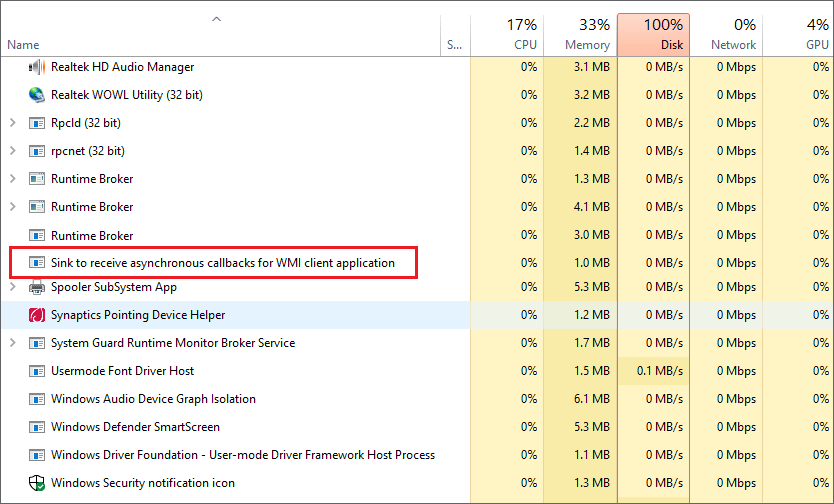
Software developers can write scripts and programs that interact with and question many operating system components, including devices, user accounts, and Windows services, using the Unsecapp.exe tool. It facilitates their ability to manage and access the OS’s internal features.
Is Unsecapp.exe a Virus?
Unsecapp.exe isn’t a virus, though. It belongs to the Microsoft Windows operating system as a valid piece of software. It facilitates communication between the software on your machine and a distant server.
Unsecapp.exe is advised to perform a reliable antivirus scan to rule out any potential infection.
Can I Disable Unsecapp.exe?
Unsecapp.exe is a service that you can turn off. The Windows operating system cannot run properly without this process. Your computer won’t be able to use WMI correctly if you deactivate it, significantly reducing system performance.
Additionally, eliminating unsecapp.exe will interfere with other applications that use WMI.
How to Remove Unsecapp.exe from Windows 10
The genuine unsecapp.exe program cannot be stopped or removed on Windows 10. It is an essential operating system component that runs in the background.
If you tried to delete or stop it, Windows would malfunction and crash, requiring completely reinstalling the operating system. So, to maintain your computer operating efficiently, it’s better to let it be and do what it does.
If you prefer not to utilize a third-party solution, you may always do a scan using Windows Security.
- You must use Windows Security to do a boot-level scan of your computer if you still need to install a third-party antivirus program. The Settings option can be found by right-clicking the Start menu
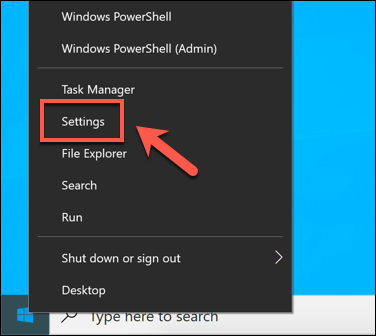
- Select Windows Security > Open Windows Security from the Update & Security menu in the Settings menu. In doing so, a different Windows Security menu will appear

- Pick Virus & threat protection from the left-hand menu of the new Windows Security, then pick Scan options

- Click the Scan Now button after selecting Microsoft Defender Offline Scan from the Scan options menu
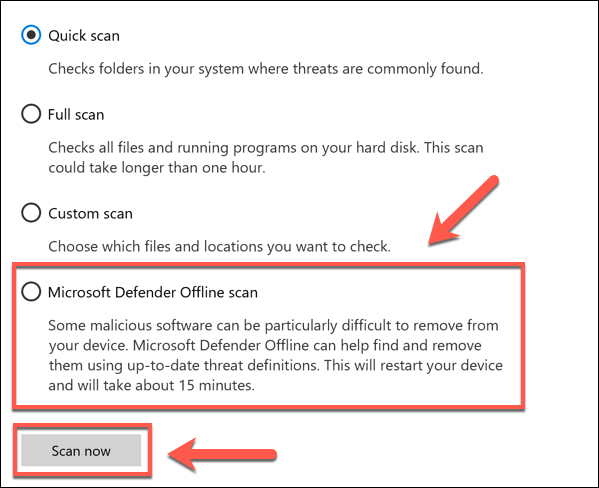
Windows will restart your computer and check your system files for any viruses.
How to Check if Unsecapp.exe (Collector for Asynchronous Callbacks for WMI Client Applications) is Real or Not?
To check if unsecapp.exe is real or not, follow these steps:
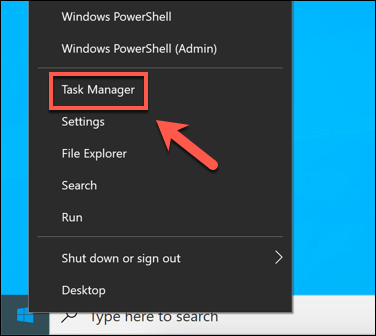
- Get the Task Manager open: Input “Ctrl + Shift + Esc” on your keyboard, or right-click the taskbar and choose “Task Manager”
- Activate the “Processes” Tab: Click the “Processes” tab in the Task Manager
- Search the list of processes for “unsecapp.exe” to see if it exists. Verify whether it’s associated with the Windows Management Instrumentation (WMI) service by looking at the “Description” column
- Click the right mouse button on the unsecapp.exe process and choose “Open File Location” or “Properties.” The program’s unsecapp.exe file’s location will display on the screen
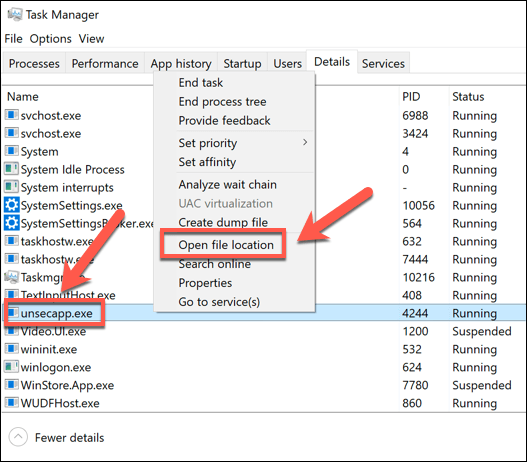
- Choose “Properties” when you right-click the unsecapp.exe file if you can. Check the “Digital Signatures” tab in the properties box to see if Microsoft Corporation signs the file
- Scan your PC with a reliable antivirus or anti-malware program. Malicious or false copies of unsecapp.exe can be found and removed using trusted antivirus software
Implementing Sinks in a WMI Client Application
Developers must follow the following general procedures to implement a sink in a WMI client application:
- To handle the incoming asynchronous callbacks, create an interface that specifies the appropriate handling techniques. When an event occurs, the WMI provider will use the methods in this interface to handle it
- Create a class that carries out the callback methods’ actual implementation while also providing the sink interface
- Following implementation, subscribe to the desired events or data changes to register the information with the WMI provider
- The registered sink object will receive asynchronous callbacks from the WMI provider whenever the subscribed events are triggered. The client application can then process the received data as necessary by calling the callback functions of the sink
Reasons why Unsecapp Starts Automatically – Sink to Receive Asynchronous Callbacks for WMI Client Application
When your computer requires it, Unsecapp.exe starts to run. Unsecapp.exe, for example, functions as a helper in the middle when you install specific software that has to communicate with a server outside of your computer to ensure that communication goes smoothly.
It frequently occurs with programs like Skype, Discord, and some antivirus software. If you notice it is running automatically, Unsecapp.exe is performing its job to support those applications’ suitable operation.
People often believe that uninstalling Avast Antivirus will turn it off. . Unsecapp.exe is not a component of Avast, as every user should be aware. Avast instead uses it to speak with its distant server.
Conclusion
In conclusion, sinks are essential for the efficient operation of WMI between programs and the system. They ensure that updates happen quickly and don’t use resources by checking frequently.
Developers may build dependable, responsive, and effective WMI applications that can effectively handle real-world circumstances with a solid understanding of sinks.