Launch Options
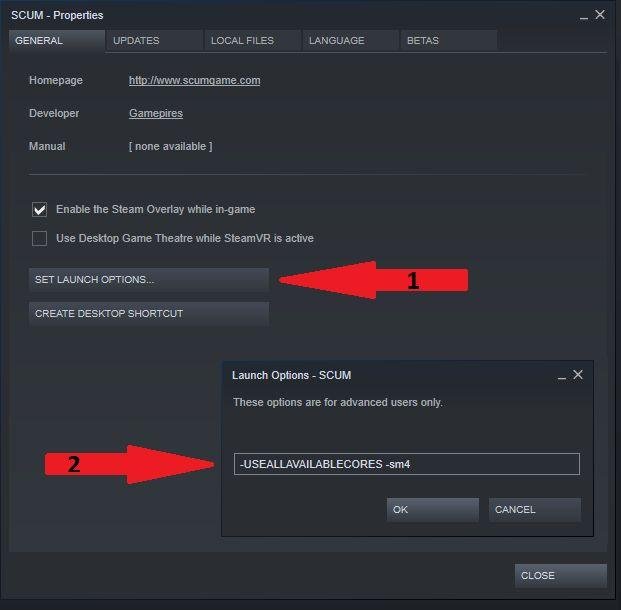
Open Steam Library and right click on SCUM. Then go to “Properties” and click on “Set Launch Options”. There type (copy paste) the following commands:
-USEALLAVAILABLECORES -sm4
Commands explained:
-sm4
This will alter shading from directx 11 to directx 10. It will not look as magnificent (it’ll look just a little bit more darker) however it will run more smoothly hence your fps increase.
This is only one of the most essential fps control for unrealengine. (It gave me an increase of fps from 72 to 120 on single participant and from 67 to 92 on multiplayer server)
-USEALLAVAILABLECORES
This will ensure that all of your CPU cores are being used while running the game. (5 fps increase)
Please Read
1- Basically “-sm4” forces your PostProcessQuality from 2 to 0. With the last update of Scum, in order to work at it’s full potential (because ingame it will still be set on 2 since the lowest option is MEDIUM for PostProcessingQuality you must also open your “GameUserSettings.ini” from:
C:\Users\ComputerName\AppData\Local\SCUM\Saved\Config\WindowsNoEditor
and manually change PostProcessQuality= from 2 to 0 (for both of them).
2- Besides the FPS that “-sm4” gives you, it will also make your game not be as bright (see picture ‘before and after’ below) so try and set your shadow precision (in game video setting) to the lowest. It will make it a little bit more brighter.
3- If you still do not like the low brightness the “-sm4” command gives you, just remove it from your set launch options and if that doesn’t do it, then just delete your GameUserSettings.ini from your:
C:\Users\ComputerName\AppData\Local\SCUM\Saved\Config\WindowsNoEditor.
I suggest making a copy of that file before you apply the manual, just in case to save your already made video settings. Even should you not make a copy of the file, and it, the game will still run with no issues (a new file will be created by itself u run the game) but you’ll need to change your own ingame video settings to anything you like since it is going to start as default video settings.