Don’t miss out on Instagram! Discover the significance of being an Instagram user in 2023 with our in-depth analysis.

Instagram has become one of the most prominent pillars of the social media world of 2023, which is fast-paced and technologically advanced. There has been an increase in interest in Instagram User Meaning, which refers to a deeper exploration of the platform’s significance beyond its shiny filters.
When you post or comment and ‘Instagram user’ shows instead of the user’s name, many people start worrying about why it is showing that. You may also wonder why it shows.
Let’s take a closer look at what it means to Instagram users today and insights that influence how we live our lives online.
What does “Instagram User” Mean?
There’s a chance that “InstagramUser” will send you messages via DM or post. You cannot view this person’s account because they don’t have a profile picture. An Instagram user is the account of a friend of yours.
When a user’s profile picture changes to “Instagram User, “the following points can happen.
- The Instagram account of the person has been permanently removed
- The user’s Instagram account has been temporarily deactivated
- Instagram has temporarily or permanently banned the user’s account
- The individual has blocked you
Does “Instagram User” Mean the Account was Deleted?
It may have been erased if an account’s name has been changed to Instagram User. It’s possible that the user did something that was against Instagram rules. Both ways will stop you from seeing their account.
Furthermore, you won’t be able to DM the individual. Even if the account is briefly inactive, any messages you submit will not be sent. You will only be able to view your previous chats. You can start chatting again if the account is reactivated. If not, the chat is only an archive.
Deleted Accounts vs. Temporary Deactivations
The following table compares Instagram temporarily deactivated accounts with those that were deleted:
| Aspect | Deleted Account | Temporary Deactivation |
| Account Status | The account is permanently removed. | The account is temporarily hidden. |
| Account Restoration | Requires creating a new account. | It can be reactivated at any time. |
| Content Removal | All content, including photos, friends, and user ID, is deleted. | Photos and profiles remain hidden, but bio and followers are retained. |
| Chat Accessibility | Friends can still read old chats but cannot respond. | You become unreachable in chat. |
| Visibility in Search Results | The account and user ID are deleted and replaced with “Instagram User.” | Account does not appear in search results. |
| Followers and Following | All followers and following are lost. | All followers and following are retained. |
| Bio and Profile Information | Bio and profile information are deleted. | Bio and profile information are retained. |
What about Bans?
Terms and restrictions apply to Instagram. When you first register for the website, you consent to these. Instagram has the authority to ban someone who disobeys the rules. Instagram typically only applies restrictions when a user’s content is reported.
The duration of a ban is based on how serious the policy violation was. Bans typically only last for 48 hours. Lifetime bans from Instagram are uncommon.
How do I Know if My Friend’s Account is Permanently Deleted?
It doesn’t specify whether your friend’s account is permanently deleted or temporarily disabled. The simplest method is to ask your friend directly on another platform.
Click on the Instagram user’s profile when you see them. You can still see some information even if the user’s account is temporarily disabled. Although their postings will be gone, you can still access their bio and other contact details. The account has been permanently deactivated if the page is blank.
Does “Instagram User” Mean I’ve been Blocked?
Not at all. The “Instagram User” title doesn’t always imply you’ve been blocked. You could have been blocked, of course. You won’t receive any alert if someone blocks you on Instagram.
Tap on the Instagram user’s profile to see what details are visible. You haven’t been blocked if you can see their following count and number of followers. You will need to look more if you cannot view any information.
Here are some simple ways to determine whether you have been blocked on a social media site:
- Try using the search bar on the platform to look up the user’s profile
- There may be an obstacle if you can’t discover their profile, but it was previously viewable
- Check the user’s friend/follower list to see if you have any shared friends or followers
- Try visiting directly to their profile if you know the username or have a direct link to it
- To contact the user, try sending a message. If it doesn’t, there may be a block, as shown by the failure to proceed
- Check the user’s profile for any posts or comments they have made. You might be blocked if you can’t see them
What if I Have DMs from “Instagram User”?
If you have direct messages from Instagram users, someone you chatted to may have deactivated their account. Additionally, they might have momentarily deactivated it or blocked you.
Occasionally, “Instagramer” will be used instead of “Instagram User.” It’s important to remember that Instagram will eventually remove DMs from persons whose accounts have been terminated. After 30 days, they will no longer be visible in your inbox.
How to Fix Instagram User or Instagrammer Problem?
There are the following solutions to fix Instagram user or Instagrammer problems:
Login via Browser
- Open the Chrome or a browser
- Use that browser to sign into your Instagram account
Wait for a While
It can also be proven via Instagram bugs. So, in that case, give it 24 to 48 hours before trying to log in again.
Support Team
Instagram customer service department should be contacted. Additionally, you can email them at support@instagram.com.
How to Delete or Temporarily Deactivate your IG Account?
All your photographs, comments, and likes will be deleted if you temporarily delete your account. You can deactivate your Instagram account from a computer, a mobile browser, or an iPhone.
Deactivate your IG Account
Here are a few steps to deactivate your account:
From a computer
- Sign in to Instagram using a computer
- Go to Edit Profile by clicking your profile image
- Select “Temporarily deactivate my account” in the bottom right corner of your Instagram profile
- The reason for deactivation can be chosen in the “Why are you deactivating your account?” drop-down menu in the following step. To continue, enter your password once more
- To continue, select “Temporarily Deactivate Account” and then select “Yes” to approve or “No” to reject
From a mobile
- Use a mobile browser to access Instagram.com
- Go to Edit Profile by clicking your profile image
- Tap on “Temporarily deactivate my account” at the right bottom after scrolling down
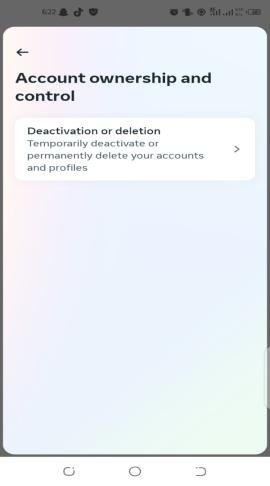


- Next, choose a reason for canceling your account from the drop-down selection. “Why are you deactivating your account?” should be clicked. Following that, provide information again to continue

- To continue, choose “Temporarily Deactivate Account,” and then either “Yes” to confirm or “No” to proceed
Delete your IG Account
Here are a few steps to delete your account by mobile or computer:
- Sign in to Instagram using a computer or a mobile device
- Select a response from the list of options appears after “Why do you want to delete?”

- Re-enter your password to continue

- Tap on delete to get rid of the account
Conclusion
In conclusion, the term “Instagram user” in 2023 encompasses a vast and diverse array of individuals who have played a central role in creating the platform’s identity.
By following this blog, you can determine whether your account has been deleted, temporarily deactivated, or blocked.
FAQs
Q. What does an Instagram user not found mean?
Instagram user not found can mean several things, including that the person has changed his username, that the user has blocked you, or that the user or Instagram may have deleted or canceled the account.
Q. What does it mean when on Instagram it says Instagram user?
If an Instagram user appears in your inbox, several factors could be at work. This person’s account was removed or disabled, one of the most frequent explanations.