

Introduction
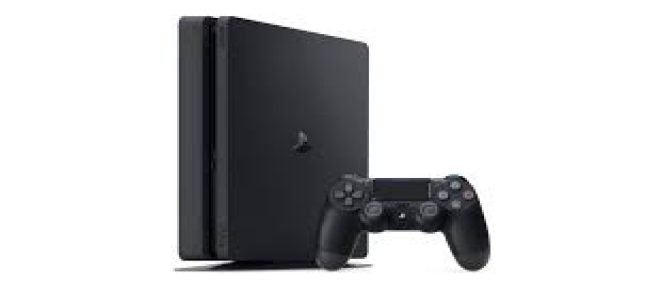
The popular game console PlayStation 4 (PS4) was created by Sony Interactive Entertainment. After its initial release in November 2013, it immediately rose to the top of the console gaming market. The PlayStation 4 provides a strong gaming experience with stunning graphics, engaging gameplay, and a huge selection of exclusive games. Access to some entertainment apps and streaming services is available, and it includes a powerful online multiplayer system. The PS4 has captured the attention of millions of gamers worldwide with its svelte design, user-friendly interface, and a large selection of games, and it is still the console of choice for those who love gaming on a console.
What does IP Address Mean?
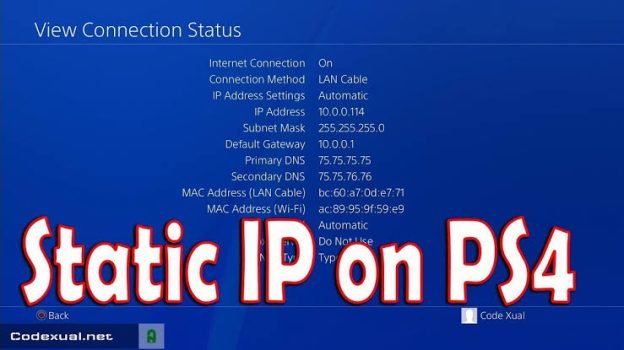
A device linked to a computer network is given a unique numerical identity called an IP address or Internet Protocol address. It acts as a method of identifying and positioning devices inside a network, enabling them to speak with one another and access the internet.
A series of integers and periods make up an IP address, such as 192.168.0.1. Network identification and host identification are its two primary uses. The host portion of the IP address identifies the particular device within the network, whereas the network portion identifies the specific network to which the device belongs.
There are two types of IP addresses.
Dynamic: A Dynamic Host Configuration Protocol (DHCP) server assigns dynamic IP addresses, which are subject to change when devices join and leave the network.
Static: IP addresses are manually set up, remain consistent, and offer a fixed address for a specific device.
Whether it’s a smaller network like the Internet or a larger network like a local network in a home, IP addresses are necessary for devices to communicate and exchange data over networks. They are essential in ensuring that information gets to its destination by directing data packets between devices.
How to Fix the Cannot Obtain IP Address Error On PS4
The PlayStation 4 (PS4), which provides a smooth and immersive gaming experience, has completely changed the gaming business. The PS4 is prone to technical issues, just like any other technological gadget.
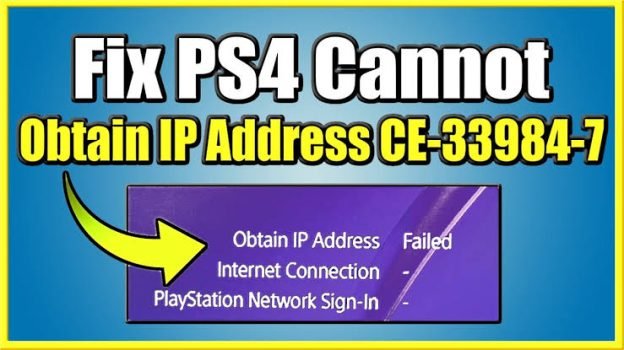
The “Cannot Obtain IP Address” error, which prohibits the console from connecting to the internet, is a typical problem that users go into. This article will look at some efficient fixes to this problem so you may resume gaming.
1. Check Network Connectivity
Before getting started with troubleshooting, make sure your network is operating properly. To make sure they can access the internet without any problems, check other devices linked to the same network. This step will assist in identifying whether the issue is with the PS4 or your network.
2. Restart the PS4 and the Network Devices
Occasionally, a straightforward restart might do wonders. Start by turning off your PS4 and removing the console’s power cord. Shut off your Wi-Fi and modem as well. Before plugging them back in and turning them on, let it a few minutes. Start your PS4 once more, then try connecting to the internet once more.
3. Change Network Settings
You might need to manually modify the network settings on your PS4 if the issue continues. Take these actions:
4. Reset Router Settings
On occasion, PS4 and router settings may be incompatible. The problem may be fixed by resetting the router to its factory default settings. Be cautious, though, as this will remove any customised settings you may have created. For information on how to reset your router, consult the user guide or manufacturer’s website.
5. Update Firmware
Ensure that the firmware on your PS4 is up to date. Firmware upgrades from manufacturers that fix bugs and compatibility problems are frequently released. For a PS4 update:
6. Get in Touch with your Internet Service Provider (ISP)
If none of the changes mentioned above work to fix the “Cannot Obtain IP Address” error, it’s likely that your ISP’s network may be having problems. To learn more about any known connectivity issues in your area and to request assistance, get in touch with your ISP’s customer care.
The “Cannot Obtain IP Address” error on your PS4 can be annoying, but you can fix it by following the appropriate troubleshooting procedures. Check your network connectivity first, then restart your PS4 and connected devices, and then change your network settings.
If the error still occurs, you might want to reset the router’s settings, update the firmware on your PS4, or get in touch with your ISP for more help. You can resume having continuous gaming sessions on your PS4 by carrying out these procedures.
Role of IP Address in Connecting PS4 to Network
The IP address plays a vital role in connecting the PS4 to a network. It works as follows throughout the connection process:
Identification of the Network
The PS4’s linked network can be located using its IP address. Data packets are ensured to be sent to the appropriate network segment and arrive at their intended location.
Device Identification
Each PS4 console connected to the network needs a different IP address for device identification. The PS4’s given IP address sets it apart from other devices connected to the same network, enabling personalized data transfer and communication.
Network Configuration
The IP address is used by the PS4 to set up its network settings when it is connected to a network. These settings, which are required for the PS4 to communicate with other devices and access the internet, include the subnet mask, default gateway, and DNS servers.
Internet Connectivity
For the PS4 to connect to the internet, the IP address is essential. The PS4 can transmit and receive data packets by interacting with routers, servers, and other internet-connected devices by using their IP addresses.
Online Multiplayer Gaming
The PS4 system and game servers can communicate with each other more easily, thanks to the IP address. Through the use of the PS4’s IP address, other users can join multiplayer games and take part in cooperative or competitive activities.
In conclusion, the PS4 uses its IP address to identify itself and communicate with other devices on the network. This enables network configuration, internet connectivity, and online gaming.
Common Issues Faced by PS4 Users
When operating their system, PS4 owners may experience some frequent problems. Among these problems are:
Connectivity Issues
Difficulties with network connectivity, such as intermittent Wi-Fi signals or unreliable internet connections. Connection issues with multiplayer servers or online gaming services. The inability to update system software and download games. Performance Challenges Gameplay that is too slow or jerky, or where the console’s performance falls short of expectations. the console getting too hot and shutting down or performing poorly.
Errors in System Software: Problems or mistakes that occur during the installation of software updates. Crashes or faults in the operating system prevent the console from starting up properly. system instability problems, such as frequently occurring errors or restarts.
Drive issues on a disc: Inability to read or recognise Blu-ray discs or game discs. The disc drive is making strange or grinding noises. discs that won’t eject or have issues with the disc insertion mechanism.
Issues with audio and video: When playing games or using multimedia programmes, there is no audio or distorted sound. display problems, like screen tearing or flickering, or a lack of video output to the TV or monitor. problems with 4K resolution compatibility or HDR (High Dynamic Range).
Issues with the controller: Problems with the DualShock 4 controller’s connectivity. Stick drift or unresponsive controller buttons. Battery or charging problems with the controller.
Reasons Behind the Error
On a PS4, the “Cannot Obtain IP Address” problem might happen for several reasons. Network configuration problems, wherein erroneous settings or conflicts prevent the PS4 from acquiring a suitable IP address, are one frequent cause. The DHCP server, which is in charge of allocating IP addresses, may potentially be at fault for this problem. The connection may be disrupted, and the process of acquiring an IP address may be hampered by network hardware issues, such as broken routers or cables.
Additionally, the PS4 may be unable to establish an IP address due to network interference from other devices or stringent security measures. Last but not least, problems with the ISP’s internet service may also be at fault. For the correct troubleshooting procedures to be used, it is essential to understand the precise reason for the mistake.
FAQs
Q1: How can I avoid getting the “Cannot Obtain IP Address” problem once more?
Ans: Make sure your network settings are configured correctly, including the DHCP settings on your router, to avoid seeing the “Cannot Obtain IP Address” issue in the future. Maintain the most recent firmware on your network hardware. Place the PS4 close to the router to minimise signal interruptions from other devices and to maintain a reliable and interference-free network environment. To keep your PS4 operating efficiently, frequently check for system software updates.
Q2: Is it possible for me to resolve the “Cannot Obtain IP Address” error myself?
Ans: Yes, by using the troubleshooting techniques outlined previously in this article, you can frequently resolve the “Cannot Obtain IP Address” error on your own. Restarting the PS4 and router is one of these processes, as is checking network connections and cables, checking DHCP settings, manually configuring the IP address, resetting the network location, and checking for firmware upgrades. These techniques can fix a variety of common problems that are the root of the error.
Q3: When the troubleshooting procedures fail, what should I do?
Ans: It is advised to contact your Internet Service Provider (ISP) or Sony support for more help if the “Cannot Obtain IP Address” error cannot be fixed by the troubleshooting techniques given previously. They can offer sophisticated troubleshooting methods.
Q4: What does it mean when my PS4 says “Cannot Obtain IP Address”?
Ans: Your PS4’s “Cannot Obtain IP Address” issue indicates that the device is unable to obtain a reliable IP address from the main network. Without an IP address, the PS4 is unable to access the network or the internet, which has connection implications and limited functionality.
Q5: Why is my PS4 not getting an IP address?
Ans: Your PS4 might not be getting an IP address for several reasons. It could be caused by problems with the DHCP server, network hardware, network interference, security settings, or even ISP-related problems. The problem may be solved by locating the precise cause and carrying out the necessary troubleshooting actions.
Conclusion
In conclusion, it can be annoying to receive the “Cannot Obtain IP Address” problem on your PS4, but with the appropriate troubleshooting techniques, it can be fixed. Network hardware or interference, DHCP server issues, security settings, or ISP-related problems are some of the common causes of this error.
The majority of the typical reasons for this problem can be addressed by restarting the PS4 and router, inspecting network cables and connections, checking DHCP settings, manually configuring the IP address, resetting network settings, and checking for firmware upgrades.
You may get beyond the “Cannot Obtain IP Address” error on your PS4 and enjoy continuous connectivity, enabling you to fully immerse yourself in your gaming experience by following the proper troubleshooting steps and asking for assistance when necessary.


