

Introduction
TikTok is a widely popular social media platform. It was launched in September 2016 by the Chinese company Byte Dance. It has captured the heart of million people and taken the world by storm. It is famous for its short video features and creative challenges. Moreover, it is a source of entertainment and inspiration these days. Also, users can express themselves by making their videos and becoming viral.

You can watch videos of your interest on TikTok. TikTok also offers tools to edit videos with filters, music, and effects. TikTok content includes various categories like dance, lip-syncing, comedy, challenges, DIY tutorials, beauty, fashion, and much more
As people fully engaged with the TikTok platform, there arose a question: Does TikTok notify when someone saves your video? In this article, we are going to know the realm of the TikTok notification system and its feature to save videos. We want to clear up any misunderstandings you may have about this subject and offer you straightforward solutions.
If you are TikTok enthusiastic and want to know about the saving features of TikTok, we have got your back. Keep in mind that TikTok is a dynamic platform, and its policies and features may change over time.
Does TikTok Notify when Someone Saves your Video
If you are wondering about the TikTok notifications Feature when someone saves your video, you have come to the right place. The answer to this question is No, TikTok does not notify you to save someone’s video. TikTok is a platform that is highly concerned about the user’s privacy. When you save the video on TikTok, the creator of this video will not receive any notification.
Your saved videos will only be shown to you and kept private by TikTok. The creator of the video will only get a notification if you manually share the video. TikTok respects the privacy of both the saver and creator and doesn’t notify the users.
Understanding TikTok Saving Feature
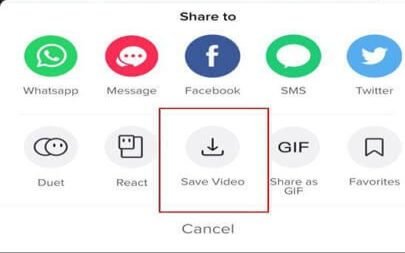
The TikTok saving feature is helpful for those users who don’t have the time to watch the video at that time. They can save the video to watch later. TikTok allows the user to save videos and bookmark videos to view later. After saving, they also have the opportunity to share videos. Here is an overview of how the TikTok saving feature works.
How to Save Video on TikTok
Save by Screen Recording
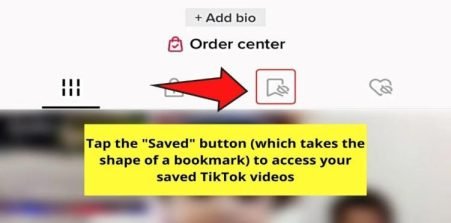
Accessing Saved Videos
Privacy Considerations
It’s essential to know that the creator of a video is not notified when it is saved on TikTok. Unless you actively choose to share them, your stored videos are private and may only be watched by you.
TikTok Notification System
A TikTok notification system is designed to inform the user about different activities happening on TikTok. This notification will help you to stay updated. Here are the activities when TikTok notifies you.
Likes and Comments
TikTok will notify you when someone likes your video or comments on your videos.
Followers and Follow Requests
TikTok will send you a notification when someone follows your account. You will also get a notification if you have a private account and someone sends you to follow request
Mentions and Tags
Another Notification you will get is of TikTok mentions and tags. It will notify you with your username or where your content has been referenced.
Direct Messages
TikTok also allows users to interact with each other through direct messages. You can stay connected with other users or share videos with them. TikTok notifies you when you get messages.
Events and Live Streams
You will also receive notifications when the creator on TikTok starts live streaming or participate in TikTok events.
It is important to note that you don’t need to worry about notifications on TikTok. You can customize which type of notifications you want to receive. It depends on your personal preferences.
TikTok Privacy and Settings
On TikTok, users have a variety of choices for customizing their experience when it comes to privacy and settings. With the help of these options, you can decide who may engage with your material, how others can discover you, and what settings you get.
Personal Account Privacy
Your TikTok account is set to public by default. It means everyone can view your videos, and your followers, and they can also send you messages. If you want privacy, you can set your account to private account by settings. With a private account, only those users can see your material who you approve.
Comments Privacy
There is a feature for comments on your videos. If you don’t want comments on your video, you can simply hide comments. You can also control who can create duets with your videos.
Messages Privacy
You can also manage the feature of direct messages. You can change the setting and limit messages to friends only, or you can completely disable the direct message option.
Discoverability
TikTok also allows you to find existing friends or connect with them. So you can sync your contacts or connect your other social media accounts to find people you know.
Notifications Privacy
You can also manage your notifications like comments, likes, followers, and mentions. You can stay updated by notification. Additionally, you can receive notifications about popular trends, challenges, or other activities happening on TikTok, helping you stay engaged with the community.
How to Save the Video by Using Third Party App?
If the creator of the video has turned off the video saving option, you can save the video by using Third-party apps.
It is important to use reliable third-party apps because it can break TikTok’s terms of service. Moreover, there could be privacy and security implications associated with these apps.
Frequently Asked Questions
Q1: Will TikTok notify me if someone saves my video?
Ana: No, TikTok does not send notifications when someone saves your video. The act of saving a video is a private action, and the original video creator does not receive any alerts or notifications about it. Your saved videos remain confidential and can only be seen by you unless you choose to share them manually.
Q2: How can I customize my TikTok notification settings?
Ans: TikTok allows you to customize your notification preferences. You can access the settings within the app and choose which types of notifications you want to receive, such as likes, comments, followers, and mentions.
Q3: Can I turn off TikTok notifications completely?
Ans: Yes, you have the option to disable notifications from TikTok if you prefer not to receive any notifications. You can adjust your notification settings to mute or turn off notifications entirely.
Q4: How can I turn off notifications for likes on TikTok?
Ans: To turn off notifications for likes on TikTok, you can go to your notification settings within the app and disable notifications specifically for likes. This way, you won’t receive alerts whenever someone likes your videos.
Conclusion
As the saving video is a private action, TikTok does not notify you when someone saves your video. TikTok takes care of your privacy first, then anything. The TikTok saving feature provides a practical way to curate your collection of videos that resonate with you. It allows for easy access to the videos you want to watch again or share with others. Hope all the confusion is resolved. With this, we have come to the end of our article.


