
How to Change your Kik Username and Display Name? Here is a Full Guide for You!

Kik Messaging & Chat App is used by thousands of people worldwide. So, if you are eager to know the difference between Kik username and Kik display name and want to change Kik username or want to change Kik display name then read this blog.
As it has contained details about what is Kik app, what is Kik username & what is Kik display name, and most importantly, how to change your Kik username and Display name. Here is a full guide for you.
What is Kik App? Everything you Need to Know
Kik is an amazing free instant texting mobile app that allows users to easily communicate with friends or family members both in direct or group messages. Moreover, you can have the Kik app on both Android and iPhone devices.

Features of Kik App
Below are the Kik App features:
How to Create Kik Account? (10 Easy Steps)
Below are the 10 steps to create Kik account:
Step 1: First, open the Kik app from your device

Step 2: Now, click on the option Sign Up and then type all the required details

Step 3: Next, upload your profile picture
Step 4: Type your first name and last name
Step 5: Now, type your username. It is worth mentioning that once you created the Kik account then you will not be able to change your username until and unless you deactivate your account)
Step 6: Next, type a valid email address. So, do not forget to confirm email verification.
Step 7: Make sure to enter a password so that nobody can guess it
Step 8: Now, enter your birth date
Step 9: Enter your phone number
Step 10: Lastly, click the Sign-up button to confirm the sign-up process.
Kik Username vs Kik Display name
There are two types of names in the Kik app:
Kik Username
Kik app username is a unique identifier name on the Kik app which you cannot change until and unless you deactivate the app.
Kik Display Name
Kik app display name is the person’s visible name on the Kik app. You can change your display name anytime you want. However, you cannot identify any unique user by the display name.
4 Tips to Have a Good Kik Username
Below are the 4 tips to have a good Kik username:
How to Change your Kik Username and Display Name?
The Kik app has two names, display name and username. Moreover, the display name is the presentation name whereas the username is the identifier and is attached to your Kik account. Moreover, you cannot change your Kik username as it identifies you and is not publicly shown.
In addition, you can only change your display name in the Kik app. So, when anyone checks your profile then they will be able to see your display name, not your username.
How to Change your Kik Username? (5 Easy Steps)
Below are the 5 steps to change your Kik username:
Step 1: Open the Kik app and click on the gear icon to open the setting
Step 2: Now, scroll down and click on Your Account option then click on Reset
Step 3: After that, you will get an email from Kik on the email address you have just registered for your current account. After that, click the deactivation link
Step 4: Next, enter your email address on the webpage in order to deactivate your Kik account
Step 5: Lastly, open the Kik app and create a new account in order to create the username that you like to have.
How to Change your Kik Display Name? (5 Easy Steps)
Below are the 5 steps to change your Kik display name:
Step 1: Firstly, open the Kik app
Step 2: Now, click on the cog symbol icon on the right of the screen in order to open the settings page

Step 3: On the setting section, navigate and click on Your Account option then navigate and click on Name

Step 4: Now, on the name section, enter the display name that you want to have

Step 5: Once you set the display name that you like, then click on the Save button to confirm the changes

How to Download and Install Kik? (3 Easy Steps)
Below are the 3 steps to download and install Kik:
Step 1: First, turn on your device then open the Play Store or App Store
Step 2: Now, in the Play Store or App Store, search for Kik app. Once you found the app then click on Install/download. On iPhone, click on Get then install the app.
Step 3: Once, you downloaded the Kik app successfully, you can then use the app.
How to View Someone’s Username on Kik App?
Users can view anyone’s username by clicking on their display name at the top of the chat and the username will appear under the display name.
How to Delete your Kik Account Permanently? (6 Easy Steps)
Below are the steps to download and install Kik:
Step 1: First, log in to your Kik app
Step 2: Click on the setting icon on the left corner

Step 3: Now, click on help and about us option

Step 4: Next, click on Help option
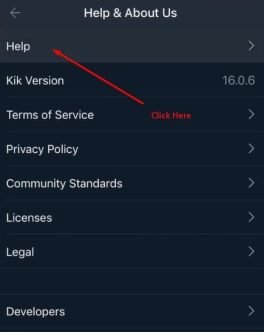
Step 5: In the search bar, type Delete Account

Step 6: Now, scroll down and click on permanent website deactivation option.

How to Use Kik on your Computer? (11 Easy Steps)
Below are the 11 steps to use Kik on your Computer/PC:
Step 1: First, install BlueStack Android Emulator as it is a free app for Windows and macOS. It allows you to play or run Android apps on your computer.

Step 2: Now, once you have installed it then open the BlueStack Emulator. There you will find the start menu or in the application folder MaciOS.

Step 3: Next, in the search bar, make sure to type Kik at the top right corner of the BlueStack Emulator. There you will get a list of matching results.

Step 4: Now, click on install next to Kik in order to install the app.

Step 5: Open the Kik app.

Step 6: Click on the login option in case you already have an account.

Step 7: Now, click on the sign-up option in order to create an account in case you are new to using this app.

Step 8: Next, fill out the form and click on Sign up.

Step 9: Make sure to follow the on-screen instructions in order to complete logging in. You should see the Find your friend on Kik screen once you successfully logged in to the app.

Step 10: Now, click on Not Now at the top of the find your friends screen. As you should skip this step as you are using an emulator, not your phone. After that, click on I/m sure when prompted in order to confirm this choice.

Step 11: Lastly, now that you have successfully installed the Kik app on your computer. Find the people in order to chat with them and send images or videos, etc.

Frequently Asked Questions (FAQs)
Below are the FAQs about How to change your Kik username and display name?
Q1: What is Kik messenger app?
Ans: Kik messenger app is a free app that enables you to talk with your friends, family, or relatives via wifi or mobile data. Moreover, the Kik app allows you to send a message with your email address which makes your chat safe and secure.
Q2: What is Kik used for?
Ans: Kik Messenger is an app used for staying connected with your family or friend by calling or chatting with them through wifi or mobile data. The Kik app only needs an email address to join rather than a phone number.
Q3: Is Kik App safe?
Ans: Yes, Kik app is a completely safe app as it does not provide your personal details to any of your contacts.
Q4: Is Kik Safe for Kids?
Ans: Kik app is available for adults. Therefore, the app is not suitable for children under 18.
Q5: Is Kik safe to send pictures?
Ans: Kik is a safe app in case you use it rightly or wisely because the app’s privacy features have made it ahead of other messenger apps.
Q6: What are Kik groups?
Ans: A Kik app may have 30 members at a time. So, when someone joins that chat group, he/she will remain there and take the slot until and unless they leave the group.
Q7: What does SMH mean on Kik?
Ans: SMH full form is Shake My Head on the Kik app. It is used to express disappointment.
Q8: Can you be anonymous on Kik?
Ans: Kik app is mainly known for its safe and secure features as it permits users to enrol without the need to provide a phone number or authentic email address.
Q9: Can you be tracked on Kik?
Ans: Kik app allows users to send messages over the web. The app does not follow the substance of the message or telephone quantities of users. Therefore, it is hard for police or others to track.
Q10: What happens if you delete Kik?
Ans: In case you delete your Kik account then you will lose all your chat history, friend data, and username. Also, once you delete your Kik account, you cannot re-register with the same username again.
Q11: Is Kik a dating app?
Ans: Kik is not a dating app. However, through the app, you can talk with people and make a strong bond with them.
Q12: Is it possible to change your Kik username?
Ans: Now, changing Kik username is not possible. However, if you want to change your Kik username then you first deactivate your account and re-download the app and activate your account with the new username.
Conclusion
Kik is a free mobile app that allows users to communicate with friends or family in direct or group messages. Moreover, users can have access to the Kik app on Android and iPhone devices. Additionally, the Kik app’s display name is the presentation name while the username is the identifier and is attached to your Kik account.
So, you cannot change your Kik username as it identifies you and is not publicly shown. Hopefully, the blog has cleared everything about the Kik app especially how to change your Kik username ad display name. so, make sure to visit our website Qnnit for more informative blogs like this,
Read these blogs to get updates about other best apps: 10 Best Apps Like TextNow In 2023 [ Top Selection ] and 9 Best Anonymous Texting Apps in 2023 for Android & iOS.