
Are you looking for ways to keep track of academic progress or how your grades are calculated? If yes, then you are not required to worry at all. Our this blog has covered the required data to help you out with how to keep track of academic progress and how grades are calculated.
PowerSchool refers to a student information system that provides a comprehensive platform for managing and monitoring educational data. Through this blog, you will learn how to find your GPA on PowerSchool, allowing you better to understand your academic performance and set goals for improvement.
What is GPA?
GPA full form is Grade Point Average. It is a numerical representation of a student’s academic performance. Moreover, GPA provides a standardized measure to measure or evaluate a student’s overall achievement based on their grades.

How is GPA Calculated?
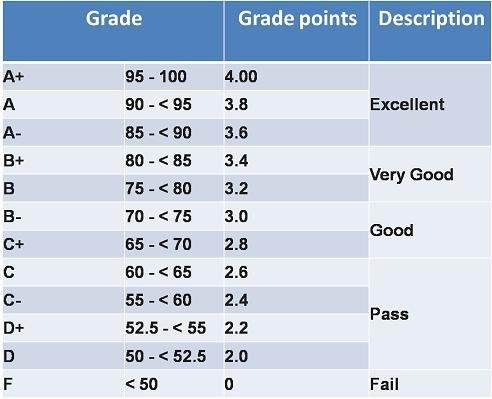
GPA is usually calculated from 0 to 4.0. It is pertinent to mention that 4.0 is the highest GPA a student can ge. On the other hand, 0 signifies the lowest score a student can get. The grading scale varies across educational institutions. However, it usually involves assigning point values to various letter grades. These point values are then used to calculate the GPA.
Below is the GPA grading system:
Importance of GPA
GPA plays a major role in a student’s academic journey because it decides whether you are passing or, unfortunately, failing. Furthermore, colleges and universities usually use a GPA system in order to evaluate a student’s academic capabilities during admissions.
It is worth noticing that a GPA has the power to affect scholarship opportunities, honors program eligibility, and future employment prospects. So, the better score you get, the better opportunity you will get in the future.
What is PowerSchool?
PowerSchool refers to educational institutions’ web-based student information system. It manages or maintains student records, attendance, assignments, and grades.
Additionally, PowerSchool provides a centralized platform that enables students, parents, and teachers to access and track crucial academic information conveniently.
Accessing PowerSchool
In order to figure out your GPA on PowerSchool, all you need to do is access your PowerSchool account. However, if you do not have an account yet, then you better make it now.
Below are the 4 steps to create a PowerSchool account:
Step 1: First, make sure to open the PowerSchool website
Step 2: Now, just click on the “Create Account” or “Sign Up” button
Step 3: Next, provide the required details like your name, email address, and a unique username and password
Step 4: Make sure to follow the on-screen instructions in order to complete the account creation process
Now that you have your PowerSchool account, follow the below 4 steps to login into PowerSchool:
Step 1: Make sure to visit the PowerSchool website
Step 2: Now, just click on the “Sign In” or “Log In” button
Step 3: Next, just enter your username along with your password
Step 4: After that, just click the “Sign In” or “Log In” button in order to access your PowerSchool account.
It is pertinent to mention that after successfully logging in, you will be greeted by the PowerSchool interface, which provides different options to get your academic data.
Finding GPA on PowerSchool (2 Easy Steps)
In order to locate your GPA on PowerSchool, you must follow the below 2 steps:
Step 1: Once logged in, make sure to locate the “Grades” or “Grading” tab in the PowerSchool interface.
Step 2: After that, just click on the “Grades” tab in order to access your grades and GPA information.
Note: It is a must to better understand the grading scale used by your educational institution, as it will help you to know your GPA accurately. It is usually displayed on the same page where your grades are listed.
Calculating GPA Manually (3 Easy Steps)
Follow the below 3 steps to calculate your GPA manually:
Step 1: First, make sure to gather your grades for all the courses you want to include in the GPA calculation
Step 2: Now just assign the right point values to each grade based on your educational institution’s grading scale
Step 3: Calculate the weighted or unweighted GPA by counting the total point values and dividing by the number of courses.
Using the GPA Calculator Feature
The best feature of the PowerSchool is that it provides a GPA calculator feature that automates the GPA calculation process. This feature is available within the “Grades” or “Grading” section of the PowerSchool interface. In addition, it enables you to enter your grades for each course and automatically calculate your GPA based on the grading scale.
Interpreting GPA on PowerSchool
In order to better understand your academic performance then, it is vital for you to understand the various types of GPAs shown on PowerSchool.
Below are 3 major aspects you must consider:
1: Understanding Cumulative GPA
Cumulative GPA shows your overall GPA for all completed courses throughout your academic journey, as it provides an overall measure of your achievements.
2: Analyzing Semester GPA
It is worth mentioning that a semester GPA reflects your GPA for a particular semester or grading period. So, it helps evaluate your performance in a specific set of courses.
3: Identifying Weighted and Unweighted GPAs
It is also possible that educational institutions might offer both weighted and unweighted GPAs. However, weighted GPAs consider the difficulty level of courses by assigning higher point values to advanced or honors classes. On the other hand, unweighted GPAs consider all courses equally, regardless of difficulty level.
Tracking GPA Trends and Improvements (3 Effective Tips)
The best thing about PowerSchool is that it allows you to control your GPA and track your progress toward academic objectives.
Below are 3 major tips for using PowerSchool features effectively:
- Make sure to regularly check your GPA on PowerSchool in order to recognize trends and monitor changes in your academic performance.
- You better just set realistic academic objectives based on your GPA and then work hard toward attaining them.
- Use PowerSchool features like progress reports, grade history, and GPA trends in order to track your improvement and identify areas for progress or growth.
GPA Troubleshooting and Common Issues (3 Effective Solutions)
Below are the 3 solutions to overcome GPA troubleshooting and common issues:
1: Discrepancies in Grading
If you encounter issues or errors in grading your assignments or tests, then make sure to contact your teacher or administrator so that you will be able to clarify the issue and request a correction.
2: Missing or Incorrect Grades
Sometimes, you might figure out missing or incorrect grades on PowerSchool. So, all you need to do is communicate with your teacher to ensure that all your grades are accurately recorded.
3: Communicating with Teachers or Administrators
Regarding any concerns or questions about your GPA or any other part of your academic performance, do not hesitate to contact your teachers or administrators and ask for help and clarification.
3 Additional Resources for Academic Success
Although PowerSchool provides a valuable understanding of your academic performance, there are additional resources you can also use to improve your success, such as:
- Look for tutoring or academic support if you need help with specific subjects or concepts.
- Make sure to set up effective time management and study skills in order to enhance your learning experience.
- Make sure to set realistic objectives and make a study routine with the aim of staying organized and motivated.
Frequently Asked Questions (FAQs)
Below are the FAQs about How to Find GPA on PowerSchool:
Q1: How often is GPA updated on PowerSchool?
Ans: The frequency of GPA updates on PowerSchool may differ as it dependent on your educational institution. However, in general terms, GPAs are updated at the end of each grading semester.
Q2: Can I calculate my GPA using only my letter grades?
Ans: You can easily calculate your GPA using only letter grades by assigning point values to each grade based on your educational institution’s grading scale.
Q3: What should I do if I notice an error in my GPA on PowerSchool?
Ans: If you encounter any issue or error in your GPA on PowerSchool, just contact your teacher or administrator to clarify the problems and request a correction.
Q4: Are weighted or unweighted GPAs more important?
Ans: The importance of weighted or unweighted GPAs may differ depending on the context. However, some educational institutions may consider weighted GPAs, especially for advanced or honors classes, while some may consider focusing on unweighted GPAs as a measure of overall achievement.
Q5: How can I improve my GPA if it’s low?
Ans: Enhancing your GPA needs hard work, dedication, and strategic effort. Some steps, like seeking academic support, developing effective study habits, setting realistic goals, and seeking guidance from your teachers or academic advisors, might help you improve your GPA.
Conclusion
PowerSchool offers a convenient way for students and parents in order to access and monitor academic details, including GPA. By reading and following the steps mentioned in this blog, you can easily figure out your GPA on PowerSchool and get insights into your academic performance. It is pertinent to mention that make sure to track your progress, set goals, and use additional resources in order to achieve academic success and be the topper of your class.
For more informative blogs, visit our website, Qnnit, as the aim of the website is to always ensure to offer you nothing less than excellent and comprehensive guides on what you are looking for. Check out these blogs. Using Technology to Simplify Your College Application Prep, Cooperative Games for Education at School and College, and Elite group of colleges crossword clue NYT.